How to connect Taiwan Government e-Procurement (web.pcc.gov.tw) to Claude
Add the Firecrawl connector to Claude once and it can call the Taiwan Government e-Procurement (web.pcc.gov.tw) API and every other provider in Firecrawl Alexandria, with no Taiwan Government e-Procurement (web.pcc.gov.tw) integration code.
To connect Taiwan Government e-Procurement (web.pcc.gov.tw) to Claude, add the Firecrawl connector to Claude, sign in on a Firecrawl team with Alexandria enabled, and ask for Taiwan Government e-Procurement (web.pcc.gov.tw) data in plain language. The connection works in Claude on the web, Claude Desktop and Cowork, and you set it up once.
Claude uses Taiwan Government e-Procurement (web.pcc.gov.tw) as an MCP tool through Firecrawl's hosted MCP server, so you don't install or host a separate MCP server for Taiwan Government e-Procurement (web.pcc.gov.tw).
Claude is Anthropic's AI assistant. Connectors give it tools from other services, and the Firecrawl connector adds web search, scraping and every data provider in Firecrawl Alexandria.
How do I connect Taiwan Government e-Procurement (web.pcc.gov.tw) to Claude?
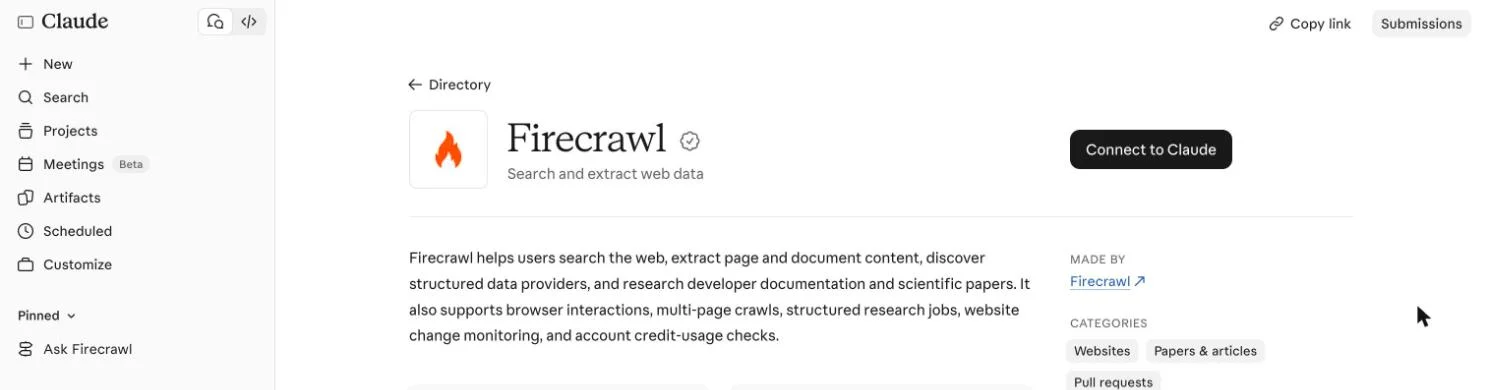
Add the Firecrawl connector
Open the Firecrawl connector in Claude's connector directory and select Connect to Claude. In Claude Desktop you can also go to Customize, then Connectors, and search for Firecrawl.
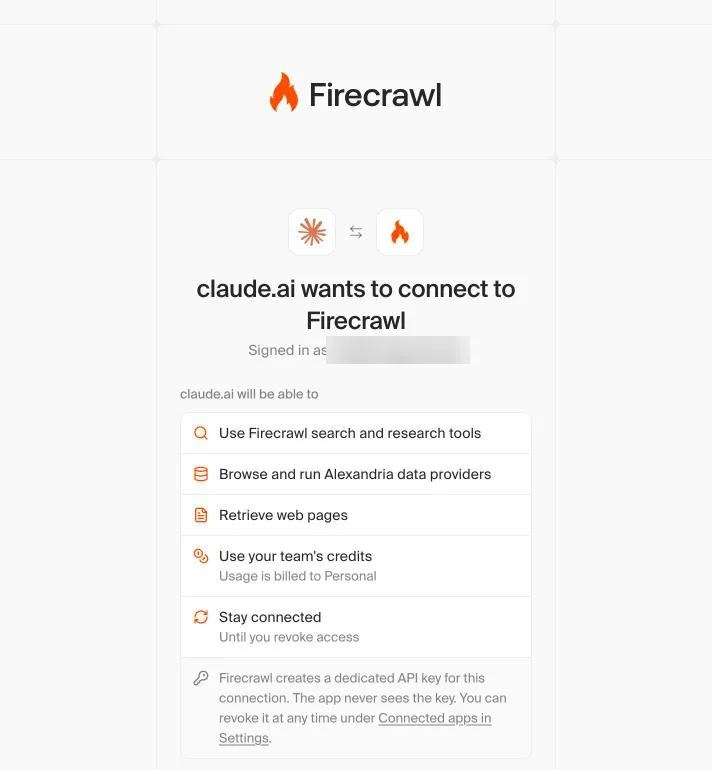
Connect your Firecrawl account
Claude opens Firecrawl in your browser. Sign in, choose a team with Alexandria enabled, and approve access. No account yet? You can create one for free in the same flow.
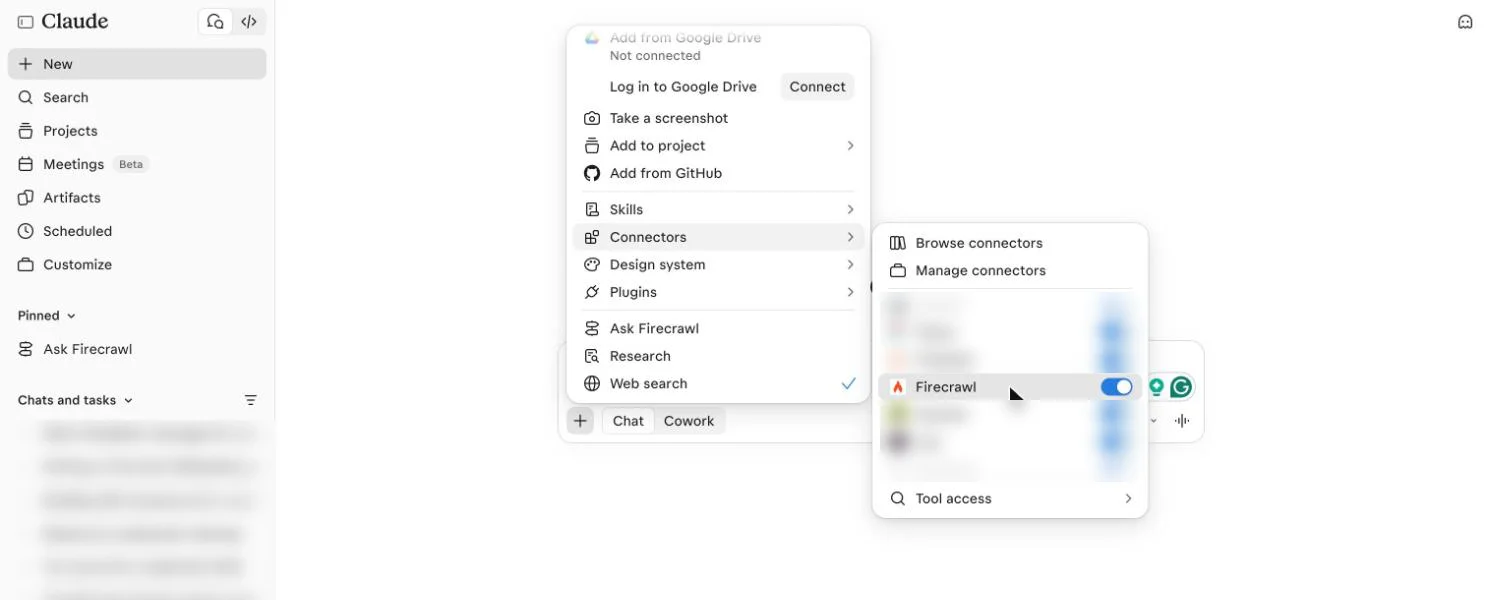
Turn on Firecrawl in a chat
In a new conversation, open the + menu, go to Connectors and switch on Firecrawl.
Ask Claude for the data
Ask in plain language and mention Taiwan Government e-Procurement (web.pcc.gov.tw) or Firecrawl Alexandria. Claude finds the Taiwan Government e-Procurement (web.pcc.gov.tw) capability that fits, checks its inputs and runs it. For example:
Use Firecrawl to find the first 10 Taiwan tender notices containing 資訊系統 that are still open for bidding, with agency, budget and bid deadline.
What can Claude do with Taiwan Government e-Procurement (web.pcc.gov.tw)?
Taiwan's Government e-Procurement System (政府電子採購網): search tender notices (招標公告) and award / failed-to-award notices (決標公告, 無法決標公告), read the full notice detail pages, and look up agency codes. Anonymous, server-rendered HTML; no login, no documents behind the member login.
Claude can run any of Taiwan Government e-Procurement (web.pcc.gov.tw)'s 5 capabilities through Alexandria. Each call is billed in Firecrawl credits on your Firecrawl team.
- Award detail: Award notice (決標公告) or failed-to-award notice (無法決標公告) detail page: agency, published data, bidders with tax ids and amounts, awarded items and the award block, all as label/value sections with the core fields parsed out. The evaluation-committee section (最有利標) is omitted. Costs 5 Firecrawl credits per call.
- Lookup agency: Look up Taiwan procuring agencies (機關名稱查詢) by a name or code keyword: returns agency codes (機關代碼) and names, with a flag for agencies that have subordinate units. The site caps the list at 50 rows. Costs 5 Firecrawl credits per call.
- Search awards: Search Taiwan award notices (決標公告), failed-to-award notices (無法決標) or cancellation notices (撤銷公告) by tender name, agency, case number, winning or submitting vendor, tendering method, category, amount range and award-notice date. One page of the result table per call with the base64 `pk` and kind for award_detail. Costs 5 Firecrawl credits per call.
- Search tenders: Search Taiwan tender notices (招標公告 and sibling notice types) by tender name, agency, case number, tendering method, category and notice date. One page of the server-rendered result table per call: agency, case number, tender name, transmission sequence, tendering method, category, notice date, bid deadline, budget and the base64 `pk` for tender_detail. Costs 5 Firecrawl credits per call.
- Tender detail: Full tender notice (招標公告) detail page: agency, procurement, tendering, bidding and other blocks as label/value sections, with the core fields (case number, name, agency code, tendering and award method, budget, notice date, bid deadline, opening time) parsed out, plus the public notice document link when offered. Costs 5 Firecrawl credits per call.
What should I ask Claude?
Name Taiwan Government e-Procurement (web.pcc.gov.tw) or Firecrawl Alexandria in the prompt so Claude reaches for it. Each example opens in Claude with the prompt filled in.
- Use Firecrawl to find the first 10 Taiwan tender notices containing 資訊系統 that are still open for bidding, with agency, budget and bid deadline.
- Use Firecrawl to find the first Taiwan tender notice containing 資訊系統 that is open for bidding and read its tendering method, bid deadline and public notice document link.
- Use Firecrawl to look up Taiwan procuring agencies containing 台灣電力 and show their agency codes and names.
- Use Firecrawl to find the first 10 Taiwan award notices containing 資訊系統 published in September 2026 and read the first notice’s bidders, awarded items and total award amount in TWD.
Troubleshooting
Why doesn't Claude use Taiwan Government e-Procurement (web.pcc.gov.tw)?
The connector has to be on in each conversation. Open the + menu, go to Connectors and check that Firecrawl is switched on, then ask again and name Taiwan Government e-Procurement (web.pcc.gov.tw) or Firecrawl Alexandria in the prompt.
Claude says it can't reach the Firecrawl server. What should I do?
Open Customize, then Connectors, disconnect Firecrawl and connect it again. On a Team or Enterprise plan, an owner has to allow the connector before members can add it.
Why does Claude say Taiwan Government e-Procurement (web.pcc.gov.tw) isn't available?
Alexandria needs a Firecrawl team with Alexandria enabled. Reconnect Firecrawl and pick that team on the consent screen.
Use Taiwan Government e-Procurement (web.pcc.gov.tw) in other AI apps
The same Firecrawl account reaches Taiwan Government e-Procurement (web.pcc.gov.tw) from other AI apps. Pick one for its setup steps:
- Taiwan Government e-Procurement (web.pcc.gov.tw) in ChatGPT
- Taiwan Government e-Procurement (web.pcc.gov.tw) in Cursor
- Taiwan Government e-Procurement (web.pcc.gov.tw) in Grok Bot
 Taiwan Government e-Procurement (web.pcc.gov.tw) in Muse
Other data providers you can connect to Claude
Frequently Asked Questions
What is Firecrawl?
Firecrawl is the web data API to search, scrape and interact with the web at scale. It turns websites into clean, LLM-ready data for AI agents and apps. The Firecrawl connector brings those tools into Claude, along with every data provider in Firecrawl Alexandria.
What is Firecrawl Alexandria?
Firecrawl Alexandria is Firecrawl's library of 550+ data providers for AI agents, Taiwan Government e-Procurement (web.pcc.gov.tw) among them. Each provider returns structured data through documented capabilities. Claude finds the capability that fits your question and calls it through the Firecrawl connector, so you don't write any integration code. Alexandria needs a Firecrawl account signed in on a team with Alexandria enabled, or an API key from such a team; keyless connections don't include it.
Is there a Taiwan Government e-Procurement (web.pcc.gov.tw) MCP server for Claude?
Claude reaches Taiwan Government e-Procurement (web.pcc.gov.tw) through Firecrawl's hosted MCP server, which serves Taiwan Government e-Procurement (web.pcc.gov.tw) and every other Alexandria provider as tools. Add the Firecrawl connector once and you don't install or host a separate MCP server for Taiwan Government e-Procurement (web.pcc.gov.tw).
What does connecting Taiwan Government e-Procurement (web.pcc.gov.tw) to Claude unlock?
Claude can run all 5 of Taiwan Government e-Procurement (web.pcc.gov.tw)'s capabilities, including Award detail, Lookup agency and Search awards, from any chat, with structured results it can sort, compare and summarize. For example, ask: "Use Firecrawl to find the first 10 Taiwan tender notices containing 資訊系統 that are still open for bidding, with agency, budget and bid deadline." In the same conversation, Claude can combine Taiwan Government e-Procurement (web.pcc.gov.tw) with Firecrawl's web search and scraping and the other providers in Firecrawl Alexandria.
Do I need my own Taiwan Government e-Procurement (web.pcc.gov.tw) account or API key to use it in Claude?
No. Claude calls Taiwan Government e-Procurement (web.pcc.gov.tw) through Firecrawl Alexandria and each call is billed in Firecrawl credits, so you don't need a separate Taiwan Government e-Procurement (web.pcc.gov.tw) account or API key.
How much does it cost to use Taiwan Government e-Procurement (web.pcc.gov.tw) in Claude?
Each Taiwan Government e-Procurement (web.pcc.gov.tw) call costs 5 Firecrawl credits. The capability list on this page shows each price and its unit. The credits come from the Firecrawl team you connect to Claude, and finding the right capability is free.
Can Claude use other providers besides Taiwan Government e-Procurement (web.pcc.gov.tw)?
Yes. The same Firecrawl connector reaches every provider in Firecrawl Alexandria, along with Firecrawl's web search and scraping, so you connect once.
Can I use Taiwan Government e-Procurement (web.pcc.gov.tw) in other AI apps?
Yes. Connect Firecrawl to ChatGPT, Cursor, Grok Bot, Muse signed in on a Firecrawl team with Alexandria enabled, or use the Firecrawl MCP server, CLI or API with an API key from that team, and the same Taiwan Government e-Procurement (web.pcc.gov.tw) capabilities are available there. Keyless connections don't include Alexandria.