How to connect World Table Tennis to Claude
Add the Firecrawl connector to Claude once and it can call the World Table Tennis API and every other provider in Firecrawl Alexandria, with no World Table Tennis integration code.
To connect World Table Tennis to Claude, add the Firecrawl connector to Claude, sign in on a Firecrawl team with Alexandria enabled, and ask for World Table Tennis data in plain language. The connection works in Claude on the web, Claude Desktop and Cowork, and you set it up once.
Claude uses World Table Tennis as an MCP tool through Firecrawl's hosted MCP server, so you don't install or host a separate MCP server for World Table Tennis.
Claude is Anthropic's AI assistant. Connectors give it tools from other services, and the Firecrawl connector adds web search, scraping and every data provider in Firecrawl Alexandria.
How do I connect World Table Tennis to Claude?
Add the Firecrawl connector
Open the Firecrawl connector in Claude's connector directory and select Connect to Claude. In Claude Desktop you can also go to Customize, then Connectors, and search for Firecrawl.
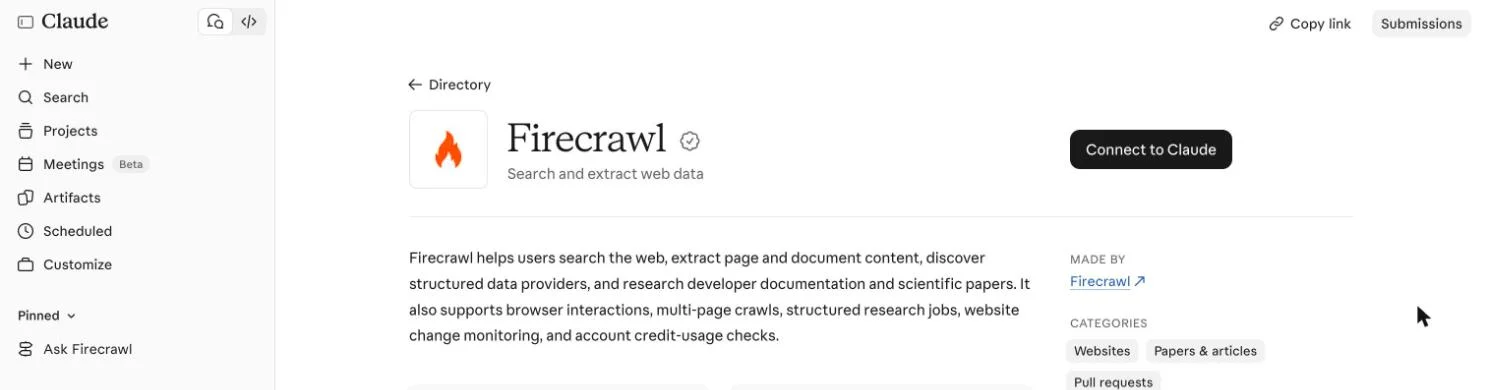
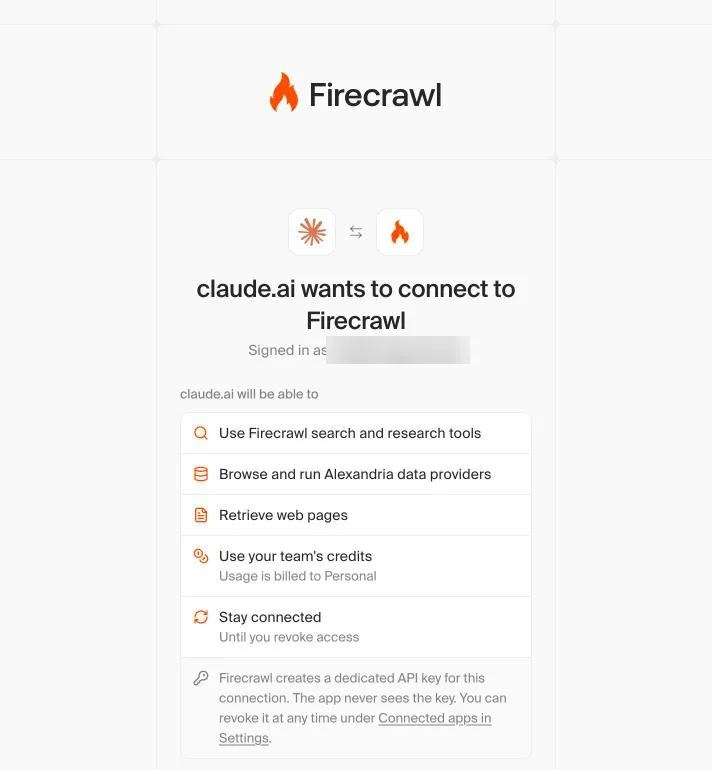
Connect your Firecrawl account
Claude opens Firecrawl in your browser. Sign in, choose a team with Alexandria enabled, and approve access. No account yet? You can create one for free in the same flow.
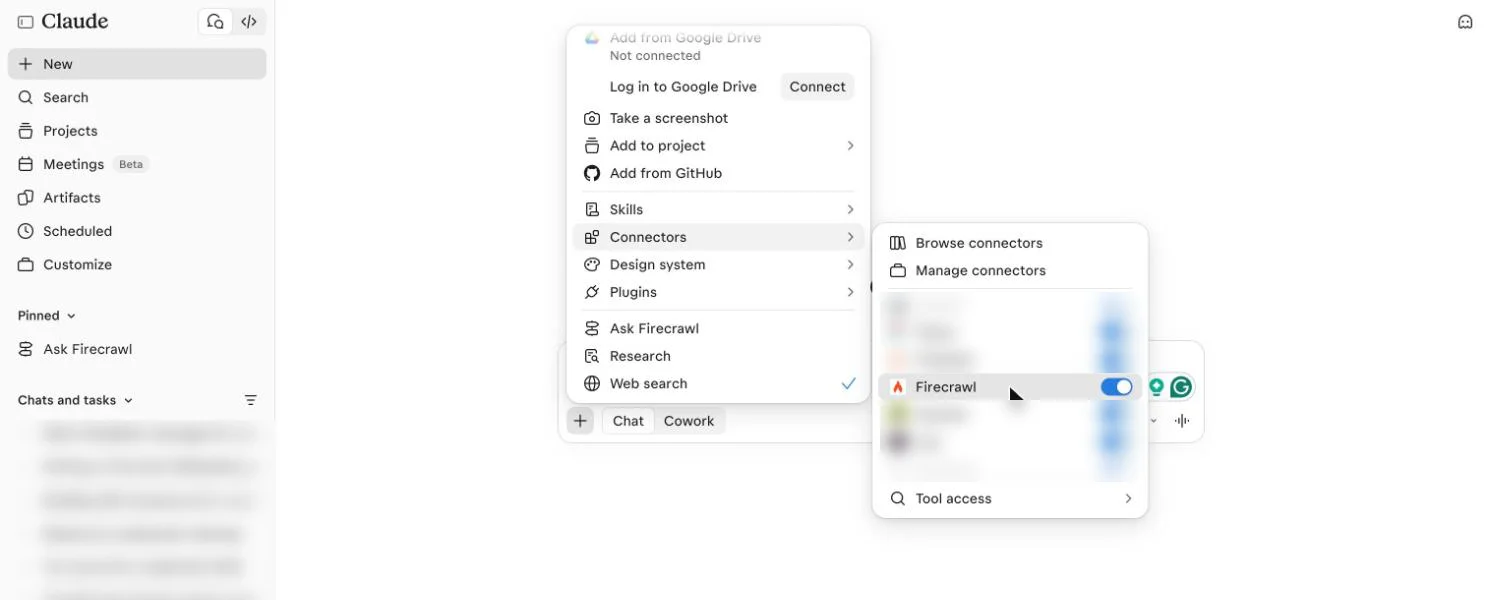
Turn on Firecrawl in a chat
In a new conversation, open the + menu, go to Connectors and switch on Firecrawl.
Ask Claude for the data
Ask in plain language and mention World Table Tennis or Firecrawl Alexandria. Claude finds the World Table Tennis capability that fits, checks its inputs and runs it. For example:
Use Firecrawl to show the current top 10 ITTF senior women’s singles players with ranking points, previous rank and publication date.
What can Claude do with World Table Tennis?
Public WTT table tennis events, official match results and cards, and senior/youth ITTF ranking lists.
Claude can run any of World Table Tennis's 5 capabilities through Alexandria. Each call is billed in Firecrawl credits on your Firecrawl team.
- Event results: Official match results for one WTT/ITTF event, identified by its numeric event id (from `events`). Returns every official match with round, start time and, by default, the full match card (competitors, game scores, winner). Filter by sub-event (MS, WS, MD, WD, XD, MT, WT, XT) and round (FNL, SFNL, QFNL, 8FNL, R32, R64, RND1.., GP). Archived events come from the archive file; events still in progress come from the live official-result feed, whose completed matches are returned as they become official. Unknown events, and events without official results yet, return an upstream not-found error. Costs 5 Firecrawl credits per call.
- Events: Search the WTT/ITTF tournament calendar (2022 to date, including scheduled events). Input optionally narrows by season year, free-text name/city/country and three-letter association code; returns event ids (needed by event_results and match), names, tier, dates, venue and sub-events, latest first. Costs 5 Firecrawl credits per call.
- Match: One match card by event id and WTT document code (as listed by `event_results`): competitors with ITTF ids and associations, best-of, per-game points, overall score, status, venue, table, local/UTC start and duration. Unknown document codes return an upstream not-found error. Costs 5 Firecrawl credits per call.
- Ranking weeks: Published ITTF senior ranking weeks (year, week number, publication date), newest first. Input is just an optional limit; useful to learn which week the `rankings` list reflects and how often it updates. Costs 5 Firecrawl credits per call.
- Rankings: Current ITTF world ranking list. Input selects senior (SEN, default) or youth (YOU) category, the list (MS/WS singles, MD/WD/XD doubles pairs, MDI/WDI/XDI doubles individual; default MS), an optional youth age group (U19, U17, U15, U13, U11) and an optional association filter. Returns rank, previous rank, points, player or pair identity and the publication date of the week in force. Costs 5 Firecrawl credits per call.
What should I ask Claude?
Name World Table Tennis or Firecrawl Alexandria in the prompt so Claude reaches for it. Each example opens in Claude with the prompt filled in.
- Use Firecrawl to show the current top 10 ITTF senior women’s singles players with ranking points, previous rank and publication date.
- Use Firecrawl to find completed WTT events hosted in Sweden in 2025 and show the men’s singles final results for the latest returned event.
- Use Firecrawl to find the Europe Smash Sweden 2026 event and show the women’s singles final match card, including game scores, competitors and duration.
- Use Firecrawl to show the top 10 Japanese players in the current ITTF under-19 girls’ singles ranking with points and publication date.
Troubleshooting
Why doesn't Claude use World Table Tennis?
The connector has to be on in each conversation. Open the + menu, go to Connectors and check that Firecrawl is switched on, then ask again and name World Table Tennis or Firecrawl Alexandria in the prompt.
Claude says it can't reach the Firecrawl server. What should I do?
Open Customize, then Connectors, disconnect Firecrawl and connect it again. On a Team or Enterprise plan, an owner has to allow the connector before members can add it.
Why does Claude say World Table Tennis isn't available?
Alexandria needs a Firecrawl team with Alexandria enabled. Reconnect Firecrawl and pick that team on the consent screen.
Use World Table Tennis in other AI apps
The same Firecrawl account reaches World Table Tennis from other AI apps. Pick one for its setup steps:
- World Table Tennis in ChatGPT
- World Table Tennis in Cursor
- World Table Tennis in Grok Bot
 World Table Tennis in Muse
Other data providers you can connect to Claude
Frequently Asked Questions
What is Firecrawl?
Firecrawl is the web data API to search, scrape and interact with the web at scale. It turns websites into clean, LLM-ready data for AI agents and apps. The Firecrawl connector brings those tools into Claude, along with every data provider in Firecrawl Alexandria.
What is Firecrawl Alexandria?
Firecrawl Alexandria is Firecrawl's library of 550+ data providers for AI agents, World Table Tennis among them. Each provider returns structured data through documented capabilities. Claude finds the capability that fits your question and calls it through the Firecrawl connector, so you don't write any integration code. Alexandria needs a Firecrawl account signed in on a team with Alexandria enabled, or an API key from such a team; keyless connections don't include it.
Is there a World Table Tennis MCP server for Claude?
Claude reaches World Table Tennis through Firecrawl's hosted MCP server, which serves World Table Tennis and every other Alexandria provider as tools. Add the Firecrawl connector once and you don't install or host a separate MCP server for World Table Tennis.
What does connecting World Table Tennis to Claude unlock?
Claude can run all 5 of World Table Tennis's capabilities, including Event results, Events and Match, from any chat, with structured results it can sort, compare and summarize. For example, ask: "Use Firecrawl to show the current top 10 ITTF senior women’s singles players with ranking points, previous rank and publication date." In the same conversation, Claude can combine World Table Tennis with Firecrawl's web search and scraping and the other providers in Firecrawl Alexandria.
Do I need my own World Table Tennis account or API key to use it in Claude?
No. Claude calls World Table Tennis through Firecrawl Alexandria and each call is billed in Firecrawl credits, so you don't need a separate World Table Tennis account or API key.
How much does it cost to use World Table Tennis in Claude?
Each World Table Tennis call costs 5 Firecrawl credits. The capability list on this page shows each price and its unit. The credits come from the Firecrawl team you connect to Claude, and finding the right capability is free.
Can Claude use other providers besides World Table Tennis?
Yes. The same Firecrawl connector reaches every provider in Firecrawl Alexandria, along with Firecrawl's web search and scraping, so you connect once.
Can I use World Table Tennis in other AI apps?
Yes. Connect Firecrawl to ChatGPT, Cursor, Grok Bot, Muse signed in on a Firecrawl team with Alexandria enabled, or use the Firecrawl MCP server, CLI or API with an API key from that team, and the same World Table Tennis capabilities are available there. Keyless connections don't include Alexandria.