How to connect xAI (Grok API docs and x.ai news) to Cursor
Add the Firecrawl MCP server to Cursor once and it can call the xAI (Grok API docs and x.ai news) API and every other provider in Firecrawl Alexandria, with no xAI (Grok API docs and x.ai news) integration code.
To connect xAI (Grok API docs and x.ai news) to Cursor, add the Firecrawl MCP server to Cursor, sign in on a Firecrawl team with Alexandria enabled, and ask for xAI (Grok API docs and x.ai news) data in plain language. The connection works in Cursor's agent and chat, and you set it up once.
Cursor uses xAI (Grok API docs and x.ai news) as an MCP tool through Firecrawl's hosted MCP server, so you don't install or host a separate MCP server for xAI (Grok API docs and x.ai news).
Cursor is an AI code editor. Its agent uses MCP servers for outside tools, and the Firecrawl MCP server adds web search, scraping and every data provider in Firecrawl Alexandria.
How do I connect xAI (Grok API docs and x.ai news) to Cursor?
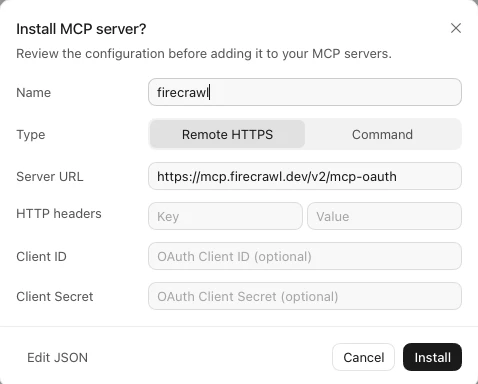
Install the Firecrawl MCP server
Open the install dialog in Cursor, check that the URL is Firecrawl's hosted server, then select Install.
Connect your Firecrawl account
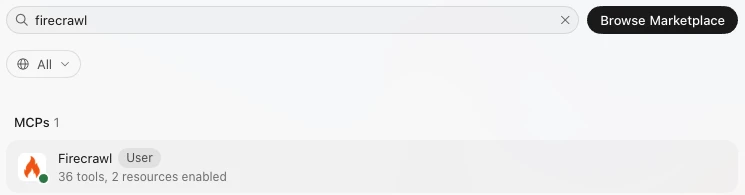
Use the server's sign-in option in Cursor's MCP settings. Firecrawl opens in your browser: sign in, choose a team with Alexandria enabled, and approve access. A green dot next to Firecrawl means it's connected.
Ask Cursor's agent for the data
In the agent chat, ask in plain language and mention xAI (Grok API docs and x.ai news) or Firecrawl Alexandria. The agent finds the xAI (Grok API docs and x.ai news) capability that fits and runs it. For example:
Use Firecrawl to run xAI (Grok API docs and x.ai news)'s Consumer plans capability. Inspect the Alexandria inputs, ask for any missing required details, and return a small sample with sources.
What can Cursor do with xAI (Grok API docs and x.ai news)?
xAI (SpaceXSI) on two hosts. docs.x.ai, the Grok API documentation: search the docs, list every page by section, read any page or one section as clean Markdown, the model lineup with prices, one model's capabilities, the full pricing page (tokens, tools, batch, storage) and dated release notes, from the docs' Markdown twins and xAI's public docs MCP server. x.ai: Grok and X subscription plans, the Grok Bot and Grok Build changelogs, the Grok Bot marketplace and plugin pages, the news index, any news post as Markdown, and other site pages such as Grok Bot and Colossus. No API key.
Cursor can run any of xAI (Grok API docs and x.ai news)'s 14 capabilities through Alexandria. Each call is billed in Firecrawl credits on your Firecrawl team.
- Consumer plans: Grok and X subscription plans from https://x.ai/pricing: each plan (Free, Plus, Premium, Super, Ultra, Teams, Enterprise) with its price, monthly USD and signup link, every row of the feature comparison table grouped by section (usage, Grok, Cursor, X, team management) with each plan's value, the pricing fine print and the FAQ. These are consumer and team subscriptions; API prices are in model_pricing. Costs 5 Firecrawl credits per call.
- Get bot listing: One Grok Bot marketplace bot (https://x.ai/bot/marketplace/bots/{slug}) or plugin share page (https://x.ai/bot/plugin/{id}): name, author, description, the bot's profile (its job, rules and working state as published), import or add link, the Cursor marketplace link and terms for plugins, plus canonical URL and robots directives. Costs 5 Firecrawl credits per call.
- Get model: One model's page on docs.x.ai (`/developers/models/{model}`): modalities, context window, aliases, regions, every labelled fact (capabilities such as function calling, structured outputs and reasoning efforts, Batch API support, limits) and its pricing and rate-limit tables. Works for text, Imagine and voice models, e.g. `grok-4.7`, `grok-imagine-image`, `speech-to-speech`. Costs 5 Firecrawl credits per call.
- Get news post: One x.ai news post (https://x.ai/news/{slug}) as Markdown: title, subtitle, description, publication date, canonical URL, social image, an outline of its headings and the body (headings, paragraphs, lists, tables, quotes and figure captions; interactive charts are represented by their captions). Accepts a slug or a post URL; an unknown post is `not_found`. Costs 5 Firecrawl credits per call.
- Get page: One docs.x.ai page as clean Markdown from its official `.md` twin: path, URL, title, docs category, lead description, an outline of every heading (level, text, anchor) and the content. Pass `section` (heading text or anchor) to get only that heading's subtree; an unknown section or page is `not_found`. Accepts a docs path (`developers/models`) or a docs.x.ai URL, including legacy `/docs/...` URLs, which redirect to their current page. Costs 5 Firecrawl credits per call.
- Get site page: Any other x.ai page (Grok Bot, Bot guides, company, Colossus, products, API, legal) as Markdown: final URL, canonical URL, title, meta description, robots directives, social image, every body link with its text and rel attribute, an outline and the readable content (site header, navigation and footer removed). Accepts a path (`/colossus`) or an x.ai URL; `/tools/` is disallowed by robots.txt and refused; an unknown page is `not_found`. Costs 5 Firecrawl credits per call.
- List changelog: Release changelog for Grok Bot (https://x.ai/changelog/bot) or Grok Build (https://x.ai/changelog/build, also x.ai/build/changelog), newest first, from the changelog's RSS feed: version, title, date, summary and each change with its category. Filter with `since` (YYYY-MM-DD) and `q` (text in the title, summary or a change); page with `limit` and `offset`. Costs 5 Firecrawl credits per call.
- List marketplace bots: Bots listed on the Grok Bot marketplace (https://x.ai/bot/marketplace) or one of its categories (`engineering`, `sales`, `marketing`, `design`, `personal`, `recruiting-people`, `product`, `operations`, `from-grok-bot-team`): name, author, description, sections, page URL and import link, plus every category. Filter with `q` (name, author or description). Costs 5 Firecrawl credits per call.
- List models: The Grok model lineup from docs.x.ai's models page (`/developers/models.md`): every text model with context window and per-million-token input, cached input and output prices for each long-context tier; Imagine image and video prices; Voice API prices; the recommended model per use case (code, chat, images, videos, voice) with its model page; and the stated knowledge cutoff. Costs 5 Firecrawl credits per call.
- List news: Posts from the x.ai news index (https://x.ai/news), newest first: slug, URL, title, summary, publication date, category (featured cards only), whether the post is featured and its card image. The index lists every post on one page. Filter with `q` (title or summary text) and `since` (YYYY-MM-DD); page with `limit` and `offset`. Costs 5 Firecrawl credits per call.
See all 14 capabilities and their inputs on the xAI (Grok API docs and x.ai news) API page.
What should I ask Cursor?
Name xAI (Grok API docs and x.ai news) or Firecrawl Alexandria in the prompt so Cursor reaches for it. Each example opens in Cursor with the prompt filled in.
- Use Firecrawl to run xAI (Grok API docs and x.ai news)'s Consumer plans capability. Inspect the Alexandria inputs, ask for any missing required details, and return a small sample with sources.
- Use Firecrawl to run xAI (Grok API docs and x.ai news)'s Get bot listing capability. Inspect the Alexandria inputs, ask for any missing required details, and return a small sample with sources.
- Use Firecrawl to run xAI (Grok API docs and x.ai news)'s Get model capability. Inspect the Alexandria inputs, ask for any missing required details, and return a small sample with sources.
- Use Firecrawl to run xAI (Grok API docs and x.ai news)'s Get news post capability. Inspect the Alexandria inputs, ask for any missing required details, and return a small sample with sources.
Troubleshooting
Why can't Cursor find xAI (Grok API docs and x.ai news)?
If Firecrawl's tools in Cursor stop at search, scrape and parse, the connection is keyless and doesn't include Alexandria. Finish the sign-in from Cursor's MCP settings, or add an API key from a team with Alexandria enabled.
Firecrawl shows a red dot in Cursor. What should I do?
Open Cursor's MCP settings, sign in to Firecrawl again, and restart the agent chat so it loads the tools.
Use xAI (Grok API docs and x.ai news) in other AI apps
The same Firecrawl account reaches xAI (Grok API docs and x.ai news) from other AI apps. Pick one for its setup steps:
- xAI (Grok API docs and x.ai news) in ChatGPT
- xAI (Grok API docs and x.ai news) in Claude
- xAI (Grok API docs and x.ai news) in Grok Bot
 xAI (Grok API docs and x.ai news) in Muse
Other data providers you can connect to Cursor
Frequently Asked Questions
What is Firecrawl?
Firecrawl is the web data API to search, scrape and interact with the web at scale. It turns websites into clean, LLM-ready data for AI agents and apps. The Firecrawl MCP server brings those tools into Cursor, along with every data provider in Firecrawl Alexandria.
What is Firecrawl Alexandria?
Firecrawl Alexandria is Firecrawl's library of 550+ data providers for AI agents, xAI (Grok API docs and x.ai news) among them. Each provider returns structured data through documented capabilities. Cursor finds the capability that fits your question and calls it through the Firecrawl MCP server, so you don't write any integration code. Alexandria needs a Firecrawl account signed in on a team with Alexandria enabled, or an API key from such a team; keyless connections don't include it.
Is there a xAI (Grok API docs and x.ai news) MCP server for Cursor?
Cursor reaches xAI (Grok API docs and x.ai news) through Firecrawl's hosted MCP server, which serves xAI (Grok API docs and x.ai news) and every other Alexandria provider as tools. Add the Firecrawl MCP server once and you don't install or host a separate MCP server for xAI (Grok API docs and x.ai news).
What does connecting xAI (Grok API docs and x.ai news) to Cursor unlock?
Cursor can run all 14 of xAI (Grok API docs and x.ai news)'s capabilities, including Consumer plans, Get bot listing and Get model, from any chat, with structured results it can sort, compare and summarize. In the same conversation, Cursor can combine xAI (Grok API docs and x.ai news) with Firecrawl's web search and scraping and the other providers in Firecrawl Alexandria.
Do I need my own xAI (Grok API docs and x.ai news) account or API key to use it in Cursor?
No. Cursor calls xAI (Grok API docs and x.ai news) through Firecrawl Alexandria and each call is billed in Firecrawl credits, so you don't need a separate xAI (Grok API docs and x.ai news) account or API key.
How much does it cost to use xAI (Grok API docs and x.ai news) in Cursor?
Each xAI (Grok API docs and x.ai news) call costs 5 Firecrawl credits. The capability list on this page shows each price and its unit. The credits come from the Firecrawl team you connect to Cursor, and finding the right capability is free.
Can Cursor use other providers besides xAI (Grok API docs and x.ai news)?
Yes. The same Firecrawl MCP server reaches every provider in Firecrawl Alexandria, along with Firecrawl's web search and scraping, so you connect once.
Can I use xAI (Grok API docs and x.ai news) in other AI apps?
Yes. Connect Firecrawl to ChatGPT, Claude, Grok Bot, Muse signed in on a Firecrawl team with Alexandria enabled, or use the Firecrawl MCP server, CLI or API with an API key from that team, and the same xAI (Grok API docs and x.ai news) capabilities are available there. Keyless connections don't include Alexandria.