How to connect Environment and Climate Change Canada weather and climate (api.weather.gc.ca) to Grok Bot
Add the Firecrawl plugin to Grok Bot once and it can call the Environment and Climate Change Canada weather and climate (api.weather.gc.ca) API and every other provider in Firecrawl Alexandria, with no Environment and Climate Change Canada weather and climate (api.weather.gc.ca) integration code.
To connect Environment and Climate Change Canada weather and climate (api.weather.gc.ca) to Grok Bot, add the Firecrawl plugin to Grok Bot, sign in on a Firecrawl team with Alexandria enabled, and ask for Environment and Climate Change Canada weather and climate (api.weather.gc.ca) data in plain language. The connection works in every Bot in your Grok Bot account, and you set it up once.
Grok Bot uses Environment and Climate Change Canada weather and climate (api.weather.gc.ca) as an MCP tool through Firecrawl's hosted MCP server, so you don't install or host a separate MCP server for Environment and Climate Change Canada weather and climate (api.weather.gc.ca).
Grok Bot is xAI's agent app. Plugins give your Bots outside tools, and the Firecrawl plugin adds web search, scraping and every data provider in Firecrawl Alexandria.
How do I connect Environment and Climate Change Canada weather and climate (api.weather.gc.ca) to Grok Bot?
Add the Firecrawl plugin
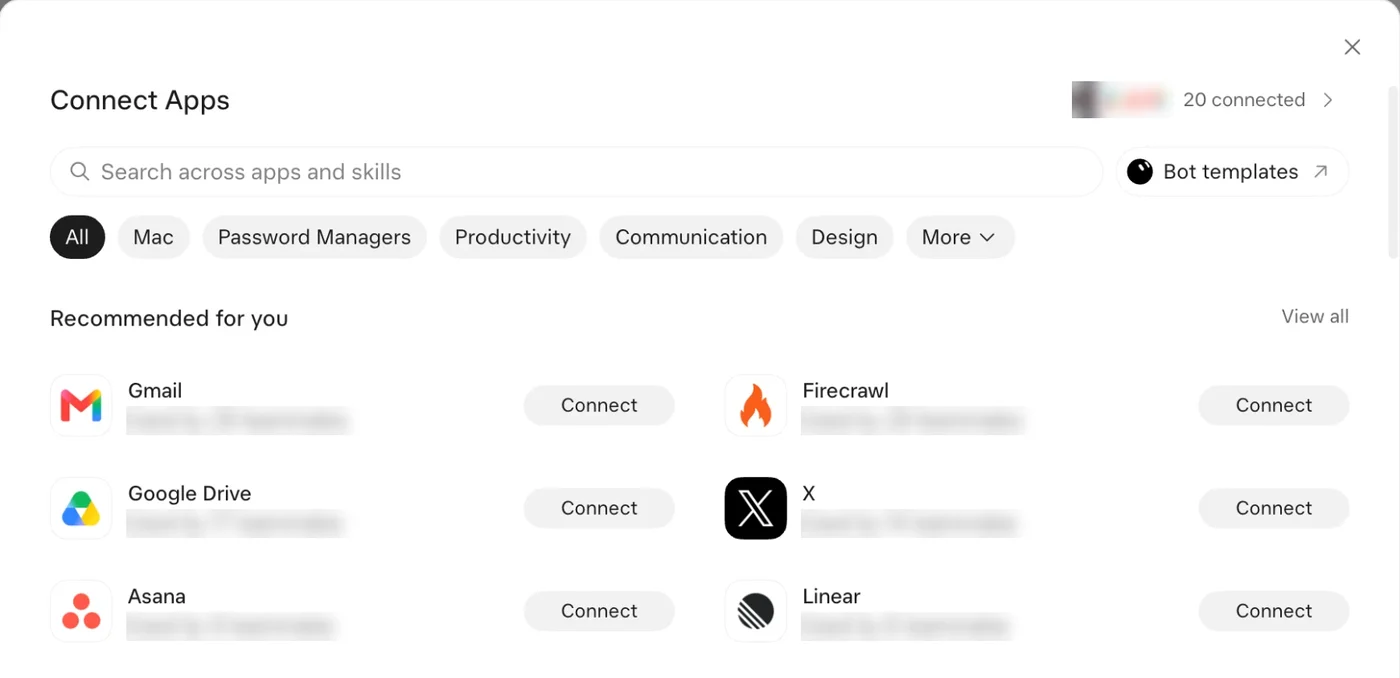
In Grok Bot, open Connect apps from the sidebar, find Firecrawl and select Connect. You can also open Firecrawl's plugin listing and select Add to Grok Bot, which opens the desktop app to finish the install.
Connect your Firecrawl account
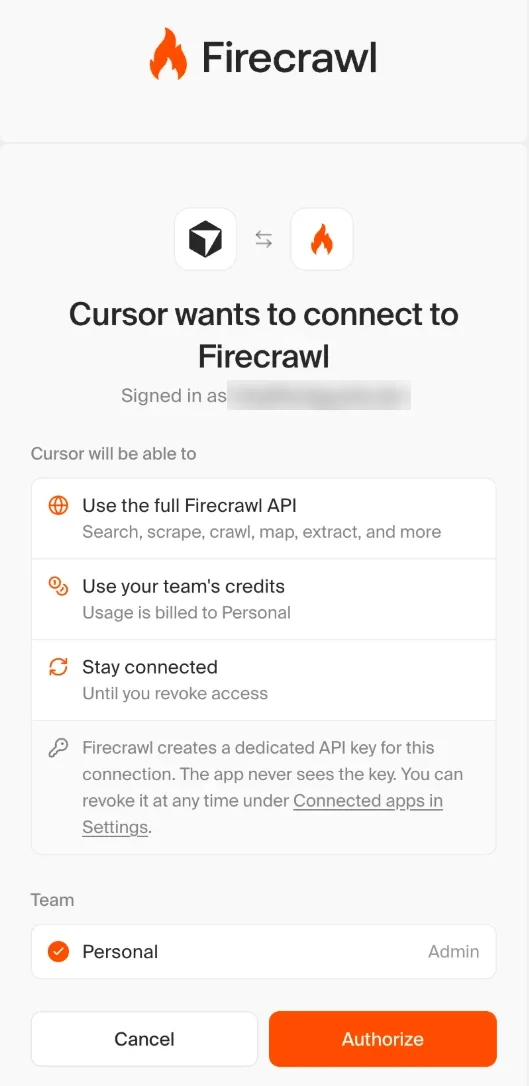
Grok Bot opens Firecrawl in your browser. Sign in, choose a team with Alexandria enabled, and select Authorize. The screen names Cursor, because the plugin is published on the Cursor Marketplace. No account yet? You can create one for free in the same flow.
Ask your Bot for the data
In a chat, ask in plain language and mention Environment and Climate Change Canada weather and climate (api.weather.gc.ca) or Firecrawl Alexandria. To make sure the Bot uses Firecrawl, type @ and choose Firecrawl first. For example:
Use Firecrawl to run Environment and Climate Change Canada weather and climate (api.weather.gc.ca)'s Air quality capability. Inspect the Alexandria inputs, ask for any missing required details, and return a small sample with sources.
What can Grok Bot do with Environment and Climate Change Canada weather and climate (api.weather.gc.ca)?
Environment and Climate Change Canada (ECCC) weather and climate data from the Meteorological Service of Canada's open GeoMet OGC API (api.weather.gc.ca), the data behind weather.gc.ca and climate.weather.gc.ca: current conditions, public forecasts, hourly forecasts and warnings for ~840 city forecast locations, active weather alerts, the Air Quality Health Index, marine forecasts, and historical climate (station search, daily observations, monthly summaries, 1981-2010 normals). English or French. Keyless and anonymous. Data Source: Environment and Climate Change Canada, under the ECCC Data Servers End-use Licence (https://eccc-msc.github.io/open-data/licence/readme_en/).
Grok Bot can run any of Environment and Climate Change Canada weather and climate (api.weather.gc.ca)'s 9 capabilities through Alexandria. Each call is billed in Firecrawl credits on your Firecrawl team.
- Air quality: Air Quality Health Index (AQHI, weather.gc.ca/airquality) for one ECCC AQHI location: the latest hourly observation with its risk category and special notes, and the newest hourly forecast publication. Choose by location_id or by lat/lon (nearest AQHI location). An unknown location_id is not_found. Costs 5 Firecrawl credits per call.
- City weather: Current conditions, the 6-to-7-day public forecast, the 24-hour hourly forecast, active warnings, regional normals and sunrise/sunset for one ECCC city forecast location (the data behind weather.gc.ca/en/location and the city pages), in English or French. Choose the location by city_id, by lat/lon (nearest of the ~840 ECCC forecast locations) or by name query (best match: exact name, prefix, contains, then region). An unknown city_id is not_found. Costs 5 Firecrawl credits per call.
- Climate daily: Daily climate observations of one ECCC climate station (climate.weather.gc.ca daily data): mean, min and max temperature, precipitation, rain, snow, snow on ground, max gust, degree days and humidity, each with its ECCC quality flag. start/end (YYYY-MM-DD) select up to 366 days; one bound alone gives 31 days from it; no bounds gives the most recent 31 days on record. An unknown climate_id is not_found; days without data in the window are an empty list. Costs 5 Firecrawl credits per call.
- Climate monthly: Monthly climate summaries of one ECCC climate station: mean and extreme temperatures, total precipitation and snowfall, days with precipitation, sunshine, degree days and the station's monthly normals where ECCC lists them. start/end (YYYY-MM) bound the months; without them the whole record. An unknown climate_id is not_found. Costs 5 Firecrawl credits per call.
- Climate normals: Canadian Climate Normals 1981-2010 of one ECCC climate station, the normals period GeoMet publishes: every element (temperatures, degree days, days above or below thresholds, rain, snow, precipitation, snow depth, sunshine, frost dates...) with its 12 monthly values, annual value and quality code. The 1991-2020 normals are not on the open API. A station without normals answers an empty element list; an unknown climate_id is not_found. Costs 5 Firecrawl credits per call.
- Climate stations: Search ECCC climate stations (the station list behind climate.weather.gc.ca historical data and normals): by climate_id, by part of the station name (query), by province, near lat/lon within radius_km (sorted by distance), and only stations with 1981-2010 normals (has_normals) or hourly data (has_hourly). Returns Climate ID, station id, coordinates, elevation and the first/last dates of daily, monthly and hourly data. An unknown climate_id is not_found; a search with no match is an empty list. Costs 5 Firecrawl credits per call.
- Find cities: Find ECCC city forecast locations (the ids city_weather and weather_alerts take) by name or near a point. query searches names and forecast regions (English or French) and ranks exact, prefix and contains name matches first; lat/lon lists locations within radius_km sorted by distance. province narrows either. A name query with no match is not_found; a point with no location in range returns an empty list. Costs 5 Firecrawl credits per call.
- Marine forecast: ECCC marine forecast and warnings for one marine area (weather.gc.ca/marine): regular forecast per sub-area (winds, weather and visibility, air temperature, freezing spray), the extended forecast, the wave forecast where issued, and marine warnings in effect. Choose by area_id or by lat/lon on the water (the containing area). An unknown area_id is not_found. Costs 5 Firecrawl credits per call.
- Weather alerts: Active ECCC public weather alerts (warnings, watches, advisories and statements, the data behind weather.gc.ca/warnings) for a city page (city_id), a point (lat/lon: alerts whose area contains it), a province or territory, or all of Canada when no selector is given. Alert text is returned exactly as issued, as the ECCC licence requires. Ended alerts are dropped unless include_ended. No alert in effect is an empty list; an unknown city_id is not_found. Costs 5 Firecrawl credits per call.
What should I ask Grok Bot?
Name Environment and Climate Change Canada weather and climate (api.weather.gc.ca) or Firecrawl Alexandria in the prompt so Grok Bot reaches for it.
- Use Firecrawl to run Environment and Climate Change Canada weather and climate (api.weather.gc.ca)'s Air quality capability. Inspect the Alexandria inputs, ask for any missing required details, and return a small sample with sources.
- Use Firecrawl to run Environment and Climate Change Canada weather and climate (api.weather.gc.ca)'s City weather capability. Inspect the Alexandria inputs, ask for any missing required details, and return a small sample with sources.
- Use Firecrawl to run Environment and Climate Change Canada weather and climate (api.weather.gc.ca)'s Climate daily capability. Inspect the Alexandria inputs, ask for any missing required details, and return a small sample with sources.
- Use Firecrawl to run Environment and Climate Change Canada weather and climate (api.weather.gc.ca)'s Climate monthly capability. Inspect the Alexandria inputs, ask for any missing required details, and return a small sample with sources.
Troubleshooting
Why doesn't my Bot use Environment and Climate Change Canada weather and climate (api.weather.gc.ca)?
Attach Firecrawl to the chat with @ before you ask, and name Environment and Climate Change Canada weather and climate (api.weather.gc.ca) or Firecrawl Alexandria in the prompt.
Add to Grok Bot doesn't open the app. What should I do?
Install the Grok Bot desktop app first, or open Connect apps in Grok Bot and search for Firecrawl.
Use Environment and Climate Change Canada weather and climate (api.weather.gc.ca) in other AI apps
The same Firecrawl account reaches Environment and Climate Change Canada weather and climate (api.weather.gc.ca) from other AI apps. Pick one for its setup steps:
- Environment and Climate Change Canada weather and climate (api.weather.gc.ca) in ChatGPT
- Environment and Climate Change Canada weather and climate (api.weather.gc.ca) in Claude
- Environment and Climate Change Canada weather and climate (api.weather.gc.ca) in Cursor
 Environment and Climate Change Canada weather and climate (api.weather.gc.ca) in Muse
Other data providers you can connect to Grok Bot
Frequently Asked Questions
What is Firecrawl?
Firecrawl is the web data API to search, scrape and interact with the web at scale. It turns websites into clean, LLM-ready data for AI agents and apps. The Firecrawl plugin brings those tools into Grok Bot, along with every data provider in Firecrawl Alexandria.
What is Firecrawl Alexandria?
Firecrawl Alexandria is Firecrawl's library of 550+ data providers for AI agents, Environment and Climate Change Canada weather and climate (api.weather.gc.ca) among them. Each provider returns structured data through documented capabilities. Grok Bot finds the capability that fits your question and calls it through the Firecrawl plugin, so you don't write any integration code. Alexandria needs a Firecrawl account signed in on a team with Alexandria enabled, or an API key from such a team; keyless connections don't include it.
Is there a Environment and Climate Change Canada weather and climate (api.weather.gc.ca) MCP server for Grok Bot?
Grok Bot reaches Environment and Climate Change Canada weather and climate (api.weather.gc.ca) through Firecrawl's hosted MCP server, which serves Environment and Climate Change Canada weather and climate (api.weather.gc.ca) and every other Alexandria provider as tools. Add the Firecrawl plugin once and you don't install or host a separate MCP server for Environment and Climate Change Canada weather and climate (api.weather.gc.ca).
What does connecting Environment and Climate Change Canada weather and climate (api.weather.gc.ca) to Grok Bot unlock?
Grok Bot can run all 9 of Environment and Climate Change Canada weather and climate (api.weather.gc.ca)'s capabilities, including Air quality, City weather and Climate daily, from any chat, with structured results it can sort, compare and summarize. In the same conversation, Grok Bot can combine Environment and Climate Change Canada weather and climate (api.weather.gc.ca) with Firecrawl's web search and scraping and the other providers in Firecrawl Alexandria.
Do I need my own Environment and Climate Change Canada weather and climate (api.weather.gc.ca) account or API key to use it in Grok Bot?
No. Grok Bot calls Environment and Climate Change Canada weather and climate (api.weather.gc.ca) through Firecrawl Alexandria and each call is billed in Firecrawl credits, so you don't need a separate Environment and Climate Change Canada weather and climate (api.weather.gc.ca) account or API key.
How much does it cost to use Environment and Climate Change Canada weather and climate (api.weather.gc.ca) in Grok Bot?
Each Environment and Climate Change Canada weather and climate (api.weather.gc.ca) call costs 5 Firecrawl credits. The capability list on this page shows each price and its unit. The credits come from the Firecrawl team you connect to Grok Bot, and finding the right capability is free.
Can Grok Bot use other providers besides Environment and Climate Change Canada weather and climate (api.weather.gc.ca)?
Yes. The same Firecrawl plugin reaches every provider in Firecrawl Alexandria, along with Firecrawl's web search and scraping, so you connect once.
Can I use Environment and Climate Change Canada weather and climate (api.weather.gc.ca) in other AI apps?
Yes. Connect Firecrawl to ChatGPT, Claude, Cursor, Muse signed in on a Firecrawl team with Alexandria enabled, or use the Firecrawl MCP server, CLI or API with an API key from that team, and the same Environment and Climate Change Canada weather and climate (api.weather.gc.ca) capabilities are available there. Keyless connections don't include Alexandria.