How to connect Canada Energy Regulator (CER) open data to Grok Bot
Add the Firecrawl plugin to Grok Bot once and it can call the Canada Energy Regulator (CER) open data API and every other provider in Firecrawl Alexandria, with no Canada Energy Regulator (CER) open data integration code.
To connect Canada Energy Regulator (CER) open data to Grok Bot, add the Firecrawl plugin to Grok Bot, sign in on a Firecrawl team with Alexandria enabled, and ask for Canada Energy Regulator (CER) open data data in plain language. The connection works in every Bot in your Grok Bot account, and you set it up once.
Grok Bot uses Canada Energy Regulator (CER) open data as an MCP tool through Firecrawl's hosted MCP server, so you don't install or host a separate MCP server for Canada Energy Regulator (CER) open data.
Grok Bot is xAI's agent app. Plugins give your Bots outside tools, and the Firecrawl plugin adds web search, scraping and every data provider in Firecrawl Alexandria.
How do I connect Canada Energy Regulator (CER) open data to Grok Bot?
Add the Firecrawl plugin
In Grok Bot, open Connect apps from the sidebar, find Firecrawl and select Connect. You can also open Firecrawl's plugin listing and select Add to Grok Bot, which opens the desktop app to finish the install.
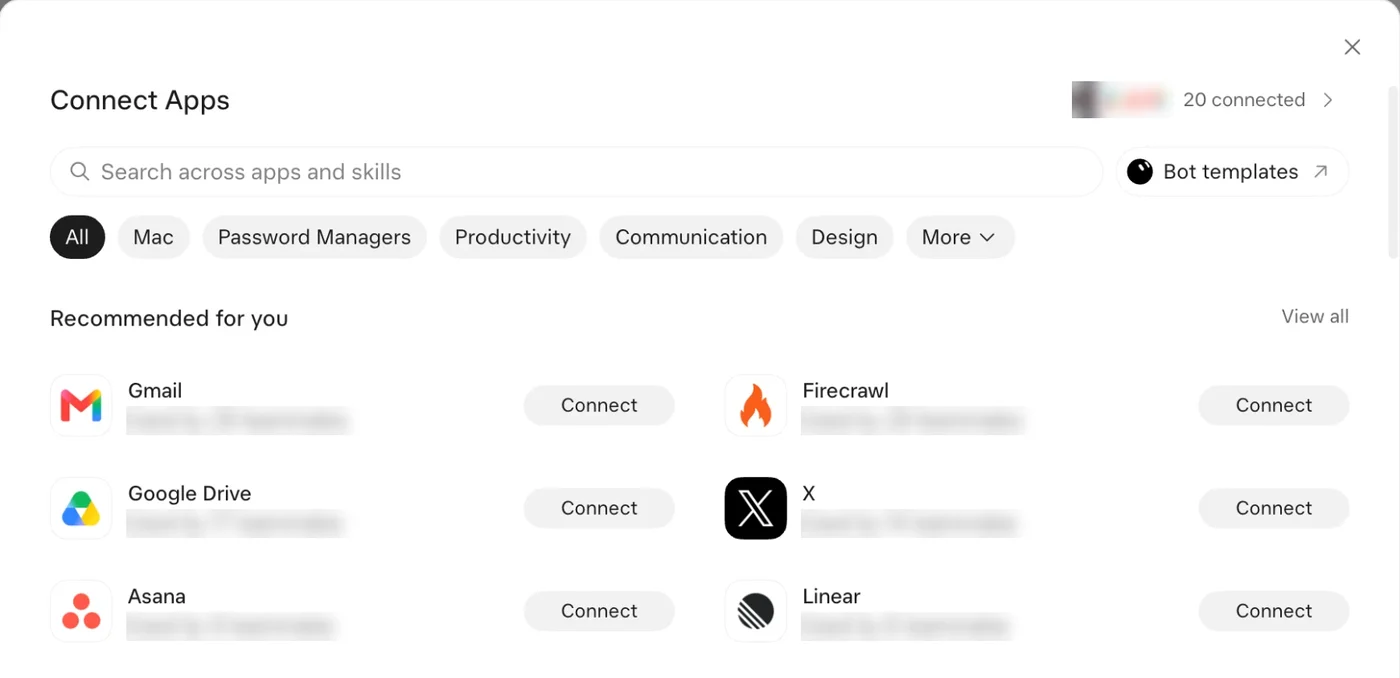
Connect your Firecrawl account
Grok Bot opens Firecrawl in your browser. Sign in, choose a team with Alexandria enabled, and select Authorize. The screen names Cursor, because the plugin is published on the Cursor Marketplace. No account yet? You can create one for free in the same flow.
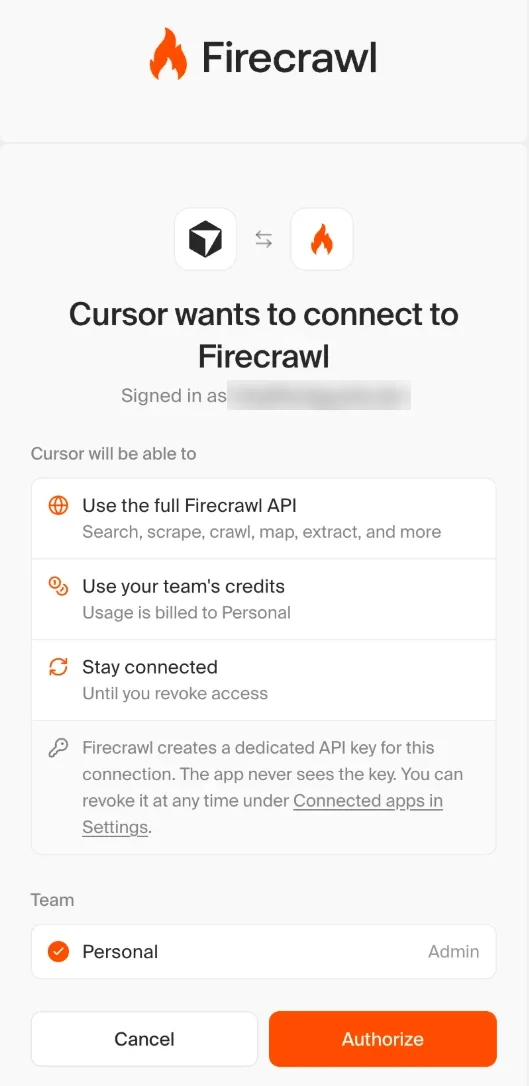
Ask your Bot for the data
In a chat, ask in plain language and mention Canada Energy Regulator (CER) open data or Firecrawl Alexandria. To make sure the Bot uses Firecrawl, type @ and choose Firecrawl first. For example:
Use Firecrawl to answer this: How full was the Trans Mountain pipeline at Westridge in 2025, month by month?
What can Grok Bot do with Canada Energy Regulator (CER) open data?
The Canada Energy Regulator's open data on www.cer-rec.gc.ca, read live and keyless from the CSV files the CER publishes under the Open Government Licence - Canada: pipeline profiles (operator, route, capacity, financials), daily and monthly pipeline throughput and capacity, pipeline tolls with their tariffs and REGDOCS filing ids, incidents at regulated pipelines since 2008, regulatory instruments (certificates, orders, licences, decision letters) with REGDOCS filing ids, Canada's Energy Future projections to 2050, and energy trade and production statistics (crude, gas, LNG, NGL, refined products, electricity). Every answer names its source file and carries the licence attribution.
Grok Bot can run any of Canada Energy Regulator (CER) open data's 7 capabilities through Alexandria. Each call is billed in Firecrawl credits on your Firecrawl team.
- Energy future: Projections from Canada's Energy Future, the CER's long-term energy supply and demand outlook to 2050, read from the edition's open data (2026, 2023 or 2021): benchmark oil and gas prices, crude oil, natural gas, NGL and hydrogen production, electricity capacity, generation and interchange, end-use demand and prices by sector, primary demand, greenhouse gas emissions, macro indicators and gas drilling, by scenario (e.g. Canada Net-zero, Current Measures), region and year. Filter by scenario, region, variable, sector or type and years; each answer lists the dataset's scenarios, regions, variables, categories and units to refine with. Costs 5 Firecrawl credits per call.
- Energy statistics: The CER's energy market and commodity statistics as open data: crude oil exports by US PADD, natural gas exports by port with values and prices, LNG exports by terminal and cargo, NGL and refined product exports, electricity exports and imports by province and US state with prices, estimated crude oil and marketable gas production by province, refinery crude runs, generating capacity and oil pipeline apportionment, monthly, weekly or annual. Filter any column by value (`filters`) and by period; newest first, paged. Each answer names the columns and lists the values of the categorical ones. Costs 5 Firecrawl credits per call.
- Incidents: Incidents reported to the CER at federally regulated pipelines and facilities since 2008, from the CER's comprehensive incident open data (about 2,000 incidents): number, types (release of substance, fire, explosion, serious injury, operation beyond design limits...), reported, occurrence and closed dates, company, province, nearest town and coordinates, substance and volume released, significance, what and why it happened, pipeline or facility, injuries, fatalities and evacuations, emergency level and investigation type. Look one up by incident number or filter by company, province, substance, type, significance, status, words and reported date; newest first, paged, with totals by year. Costs 5 Firecrawl credits per call.
- Pipelines: Key facts on the major CER-regulated oil and gas pipelines from the CER's Pipeline Profiles open data: operator and parent company, route, length, commodity, capacity, start year, interconnections, financial regulation group, links to the REGDOCS facility and toll folders and the Pipeline Profile page, and which systems have throughput and toll data here. Naming one pipeline (or company) also returns its annual financial series: revenue, cost of service, net income, rate base, return on equity and more. Costs 5 Firecrawl credits per call.
- Regulatory instruments: Regulatory instruments the CER (and the NEB before it) issued, from the CER's Regulatory Instruments Report open data (about 17,000): certificates, orders, toll orders, export licences and permits, amending orders and decision letters, each with its file number, company, decision, issued, effective, expiry and sunset dates, Governor in Council and Order in Council approval, and the REGDOCS filing ids of the decision with search links. Look one up by instrument number or filter by type, company, file number, REGDOCS filing id or issued date; newest first, paged. Costs 5 Firecrawl credits per call.
- Throughput: Pipeline throughput and capacity at a CER-regulated system's key points, from the CER's Pipeline Throughput and Capacity open data (the numbers behind the Pipeline Profiles traffic charts): natural gas systems daily (returned as monthly averages unless `granularity` is `daily`), oil systems monthly by product. Each row has throughput and capacity in thousand m3/d, GJ/d for gas, committed and available capacity and the reason for variance for oil, and utilization. Filter by key point, product, trade type and date; newest first, paged. 19 systems: NGTL, TC Canadian Mainline, Westcoast, Alliance, Foothills, M&NP, TQM, Brunswick, Suffield, Trans Mountain, Enbridge Mainline, Line 9, Keystone, Cochin, Trans-Northern, Southern Lights, Norman Wells, Westspur and Montreal. Costs 5 Firecrawl credits per call.
- Tolls: Tolls on a CER-regulated pipeline from the CER's Major Canadian Natural Gas and Oil Pipeline Tolls open data, collapsed from the CER's daily rows into effective periods: path, service, product, toll and unit, effective from and to, whether it is current, the tariff number it came from and replaced, and the REGDOCS folder and document ids of the tariff filing. Filter by path, service, product, current tolls only, or a date window; newest first, paged. Every answer also lists the system's paths, services and products. 25 systems, including Trans Mountain, Keystone, Enbridge Mainline, NGTL, TC Mainline, Westcoast, Alliance, Express and Cochin. Costs 5 Firecrawl credits per call.
What should I ask Grok Bot?
Name Canada Energy Regulator (CER) open data or Firecrawl Alexandria in the prompt so Grok Bot reaches for it.
- Use Firecrawl to answer this: How full was the Trans Mountain pipeline at Westridge in 2025, month by month?
- Use Firecrawl to answer this: What is the current Trans Mountain toll from Edmonton to Westridge for heavy crude, and which tariff filing set it?
- Use Firecrawl to list significant incidents on Trans Mountain since 2024 and what caused them.
- Use Firecrawl to answer this: What Brent price does the CER's Energy Future 2023 Canada Net-zero scenario assume for 2030?
Troubleshooting
Why doesn't my Bot use Canada Energy Regulator (CER) open data?
Attach Firecrawl to the chat with @ before you ask, and name Canada Energy Regulator (CER) open data or Firecrawl Alexandria in the prompt.
Add to Grok Bot doesn't open the app. What should I do?
Install the Grok Bot desktop app first, or open Connect apps in Grok Bot and search for Firecrawl.
Use Canada Energy Regulator (CER) open data in other AI apps
The same Firecrawl account reaches Canada Energy Regulator (CER) open data from other AI apps. Pick one for its setup steps:
- Canada Energy Regulator (CER) open data in ChatGPT
- Canada Energy Regulator (CER) open data in Claude
- Canada Energy Regulator (CER) open data in Cursor
 Canada Energy Regulator (CER) open data in Muse
Other data providers you can connect to Grok Bot
Frequently Asked Questions
What is Firecrawl?
Firecrawl is the web data API to search, scrape and interact with the web at scale. It turns websites into clean, LLM-ready data for AI agents and apps. The Firecrawl plugin brings those tools into Grok Bot, along with every data provider in Firecrawl Alexandria.
What is Firecrawl Alexandria?
Firecrawl Alexandria is Firecrawl's library of 550+ data providers for AI agents, Canada Energy Regulator (CER) open data among them. Each provider returns structured data through documented capabilities. Grok Bot finds the capability that fits your question and calls it through the Firecrawl plugin, so you don't write any integration code. Alexandria needs a Firecrawl account signed in on a team with Alexandria enabled, or an API key from such a team; keyless connections don't include it.
Is there a Canada Energy Regulator (CER) open data MCP server for Grok Bot?
Grok Bot reaches Canada Energy Regulator (CER) open data through Firecrawl's hosted MCP server, which serves Canada Energy Regulator (CER) open data and every other Alexandria provider as tools. Add the Firecrawl plugin once and you don't install or host a separate MCP server for Canada Energy Regulator (CER) open data.
What does connecting Canada Energy Regulator (CER) open data to Grok Bot unlock?
Grok Bot can run all 7 of Canada Energy Regulator (CER) open data's capabilities, including Energy future, Energy statistics and Incidents, from any chat, with structured results it can sort, compare and summarize. For example, ask: "Use Firecrawl to answer this: How full was the Trans Mountain pipeline at Westridge in 2025, month by month?" In the same conversation, Grok Bot can combine Canada Energy Regulator (CER) open data with Firecrawl's web search and scraping and the other providers in Firecrawl Alexandria.
Do I need my own Canada Energy Regulator (CER) open data account or API key to use it in Grok Bot?
No. Grok Bot calls Canada Energy Regulator (CER) open data through Firecrawl Alexandria and each call is billed in Firecrawl credits, so you don't need a separate Canada Energy Regulator (CER) open data account or API key.
How much does it cost to use Canada Energy Regulator (CER) open data in Grok Bot?
Each Canada Energy Regulator (CER) open data call costs 5 Firecrawl credits. The capability list on this page shows each price and its unit. The credits come from the Firecrawl team you connect to Grok Bot, and finding the right capability is free.
Can Grok Bot use other providers besides Canada Energy Regulator (CER) open data?
Yes. The same Firecrawl plugin reaches every provider in Firecrawl Alexandria, along with Firecrawl's web search and scraping, so you connect once.
Can I use Canada Energy Regulator (CER) open data in other AI apps?
Yes. Connect Firecrawl to ChatGPT, Claude, Cursor, Muse signed in on a Firecrawl team with Alexandria enabled, or use the Firecrawl MCP server, CLI or API with an API key from that team, and the same Canada Energy Regulator (CER) open data capabilities are available there. Keyless connections don't include Alexandria.