How to connect Discogs to Claude
Add the Firecrawl connector to Claude once and it can call the Discogs API and every other provider in Firecrawl Alexandria, with no Discogs integration code.
To connect Discogs to Claude, add the Firecrawl connector to Claude, sign in on a Firecrawl team with Alexandria enabled, and ask for Discogs data in plain language. The connection works in Claude on the web, Claude Desktop and Cowork, and you set it up once.
Claude uses Discogs as an MCP tool through Firecrawl's hosted MCP server, so you don't install or host a separate MCP server for Discogs.
Claude is Anthropic's AI assistant. Connectors give it tools from other services, and the Firecrawl connector adds web search, scraping and every data provider in Firecrawl Alexandria.
How do I connect Discogs to Claude?
Add the Firecrawl connector
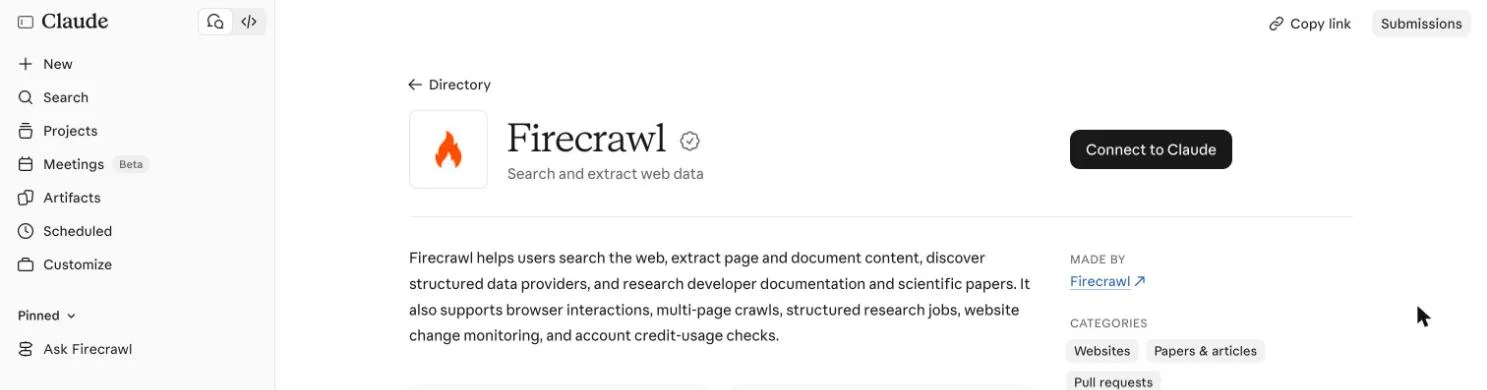
Open the Firecrawl connector in Claude's connector directory and select Connect to Claude. In Claude Desktop you can also go to Customize, then Connectors, and search for Firecrawl.
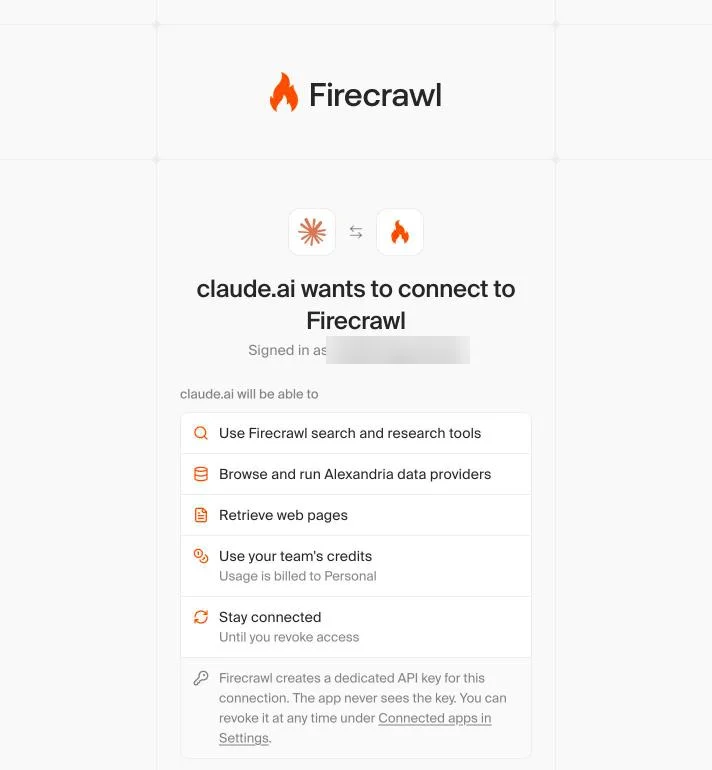
Connect your Firecrawl account
Claude opens Firecrawl in your browser. Sign in, choose a team with Alexandria enabled, and approve access. No account yet? You can create one for free in the same flow.
Turn on Firecrawl in a chat
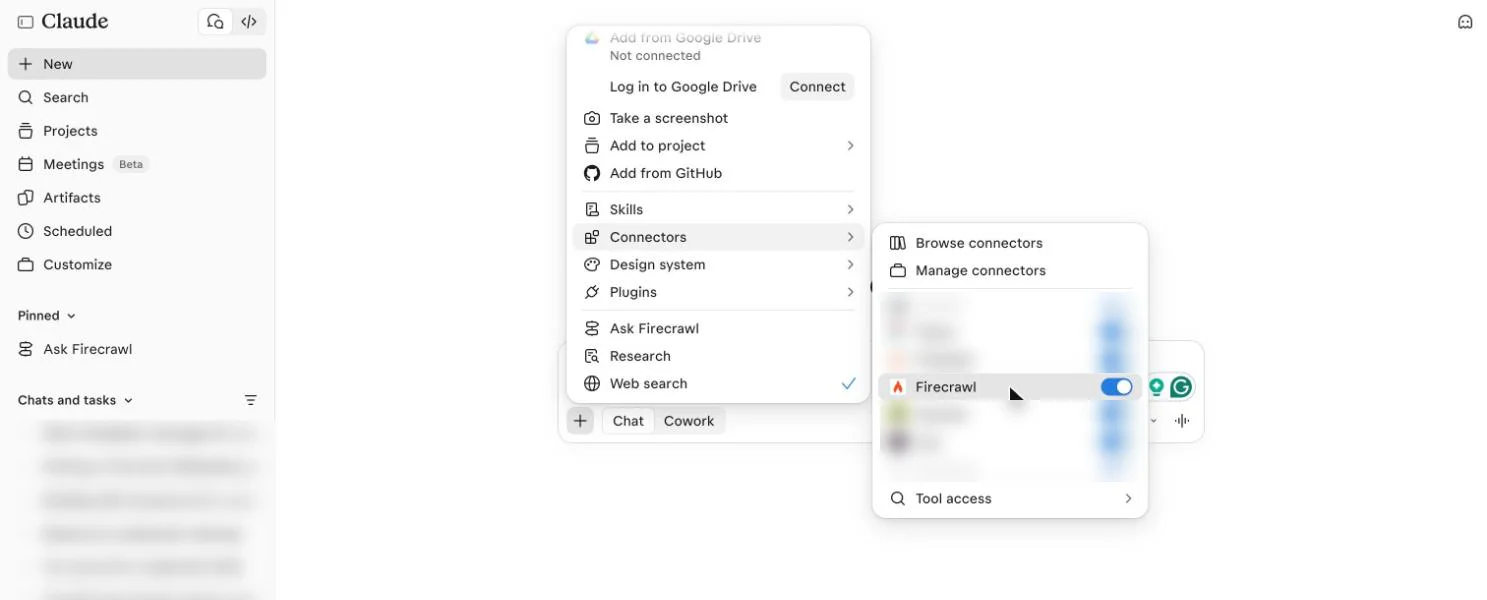
In a new conversation, open the + menu, go to Connectors and switch on Firecrawl.
Ask Claude for the data
Ask in plain language and mention Discogs or Firecrawl Alexandria. Claude finds the Discogs capability that fits, checks its inputs and runs it. For example:
Use Firecrawl to find US vinyl pressings of Radiohead’s OK Computer from 1997 and show the tracklist, label and matrix/runout identifiers for the first match.
What can Claude do with Discogs?
Search the Discogs music database and look up releases, master releases, artists and labels, down to pressings, catalog numbers and barcodes.
Claude can run any of Discogs's 8 capabilities through Alexandria. Each call is billed in Firecrawl credits on your Firecrawl team.
- Artist: One Discogs artist or group by artist ID: name, real name, profile text, name variations, aliases, members (for groups) or groups (for people), external URLs and images. Costs 5 Firecrawl credits per call.
- Artist releases: Releases by an artist (their discography as Discogs credits it), one page at a time: masters and standalone releases with role (Main, Remix, Appearance, ...), year, format and label, sortable by year, title or format. Costs 5 Firecrawl credits per call.
- Label: One Discogs label by label ID: name, profile, contact info, parent label, sublabels, external URLs and images. Costs 5 Firecrawl credits per call.
- Label releases: A label's catalog, one page at a time: every release on the label with its catalog number, artist, title, format and year, in Discogs' catalog-number order. Costs 5 Firecrawl credits per call.
- Master: One Discogs master release (the grouping of all pressings of the same album or single) by master ID: title, artists, original year, main and most recent release IDs, genres, styles, canonical tracklist, images, videos and marketplace summary. Use master_versions to list its pressings. Costs 5 Firecrawl credits per call.
- Master versions: Pressing variants of a master release: every release (country, label, catalog number, format, year) grouped under the master, one page at a time, with the filter facets Discogs offers (format, label, country, released) and optional filters and sort. Costs 5 Firecrawl credits per call.
- Release: One Discogs release (a specific pressing or edition) by release ID: artists, labels with catalog numbers, companies and pressing plants, formats and their descriptions, identifiers (barcodes, matrix/runout etchings, label codes), tracklist, notes, images, videos, marketplace count and lowest price, community have/want and rating. Costs 5 Firecrawl credits per call.
- Search: Search the Discogs database for releases, masters, artists or labels by free text, artist, release title, track, label, catalog number or barcode, optionally narrowed by year, format, country, genre and style. Returns one page of matches with type, title, year, country, formats, labels, catalog number, barcodes and IDs to pass to the detail functions. Costs 5 Firecrawl credits per call.
What should I ask Claude?
Name Discogs or Firecrawl Alexandria in the prompt so Claude reaches for it. Each example opens in Claude with the prompt filled in.
- Use Firecrawl to find US vinyl pressings of Radiohead’s OK Computer from 1997 and show the tracklist, label and matrix/runout identifiers for the first match.
- Use Firecrawl to find the master release for Daft Punk’s Discovery and list up to 20 Japanese CD editions with release year and catalog number.
- Use Firecrawl to find Aphex Twin on Discogs and list the first 20 discography entries ordered by release year, including credited role.
- Use Firecrawl to find Warp Records on Discogs and return its label profile, parent label and sublabels.
Troubleshooting
Why doesn't Claude use Discogs?
The connector has to be on in each conversation. Open the + menu, go to Connectors and check that Firecrawl is switched on, then ask again and name Discogs or Firecrawl Alexandria in the prompt.
Claude says it can't reach the Firecrawl server. What should I do?
Open Customize, then Connectors, disconnect Firecrawl and connect it again. On a Team or Enterprise plan, an owner has to allow the connector before members can add it.
Why does Claude say Discogs isn't available?
Alexandria needs a Firecrawl team with Alexandria enabled. Reconnect Firecrawl and pick that team on the consent screen.
Use Discogs in other AI apps
The same Firecrawl account reaches Discogs from other AI apps. Pick one for its setup steps:

Other data providers you can connect to Claude
Frequently Asked Questions
What is Firecrawl?
Firecrawl is the web data API to search, scrape and interact with the web at scale. It turns websites into clean, LLM-ready data for AI agents and apps. The Firecrawl connector brings those tools into Claude, along with every data provider in Firecrawl Alexandria.
What is Firecrawl Alexandria?
Firecrawl Alexandria is Firecrawl's library of 550+ data providers for AI agents, Discogs among them. Each provider returns structured data through documented capabilities. Claude finds the capability that fits your question and calls it through the Firecrawl connector, so you don't write any integration code. Alexandria needs a Firecrawl account signed in on a team with Alexandria enabled, or an API key from such a team; keyless connections don't include it.
Is there a Discogs MCP server for Claude?
Claude reaches Discogs through Firecrawl's hosted MCP server, which serves Discogs and every other Alexandria provider as tools. Add the Firecrawl connector once and you don't install or host a separate MCP server for Discogs.
What does connecting Discogs to Claude unlock?
Claude can run all 8 of Discogs's capabilities, including Artist, Artist releases and Label, from any chat, with structured results it can sort, compare and summarize. For example, ask: "Use Firecrawl to find US vinyl pressings of Radiohead’s OK Computer from 1997 and show the tracklist, label and matrix/runout identifiers for the first match." In the same conversation, Claude can combine Discogs with Firecrawl's web search and scraping and the other providers in Firecrawl Alexandria.
Do I need my own Discogs account or API key to use it in Claude?
No. Claude calls Discogs through Firecrawl Alexandria and each call is billed in Firecrawl credits, so you don't need a separate Discogs account or API key.
How much does it cost to use Discogs in Claude?
Each Discogs call costs 5 Firecrawl credits. The capability list on this page shows each price and its unit. The credits come from the Firecrawl team you connect to Claude, and finding the right capability is free.
Can Claude use other providers besides Discogs?
Yes. The same Firecrawl connector reaches every provider in Firecrawl Alexandria, along with Firecrawl's web search and scraping, so you connect once.
Can I use Discogs in other AI apps?
Yes. Connect Firecrawl to ChatGPT, Cursor, Grok Bot, Muse signed in on a Firecrawl team with Alexandria enabled, or use the Firecrawl MCP server, CLI or API with an API key from that team, and the same Discogs capabilities are available there. Keyless connections don't include Alexandria.