How to connect Montana State Library MSDI framework layers to Grok Bot
Add the Firecrawl plugin to Grok Bot once and it can call the Montana State Library MSDI framework layers API and every other provider in Firecrawl Alexandria, with no Montana State Library MSDI framework layers integration code.
To connect Montana State Library MSDI framework layers to Grok Bot, add the Firecrawl plugin to Grok Bot, sign in on a Firecrawl team with Alexandria enabled, and ask for Montana State Library MSDI framework layers data in plain language. The connection works in every Bot in your Grok Bot account, and you set it up once.
Grok Bot uses Montana State Library MSDI framework layers as an MCP tool through Firecrawl's hosted MCP server, so you don't install or host a separate MCP server for Montana State Library MSDI framework layers.
Grok Bot is xAI's agent app. Plugins give your Bots outside tools, and the Firecrawl plugin adds web search, scraping and every data provider in Firecrawl Alexandria.
How do I connect Montana State Library MSDI framework layers to Grok Bot?
Add the Firecrawl plugin
In Grok Bot, open Connect apps from the sidebar, find Firecrawl and select Connect. You can also open Firecrawl's plugin listing and select Add to Grok Bot, which opens the desktop app to finish the install.
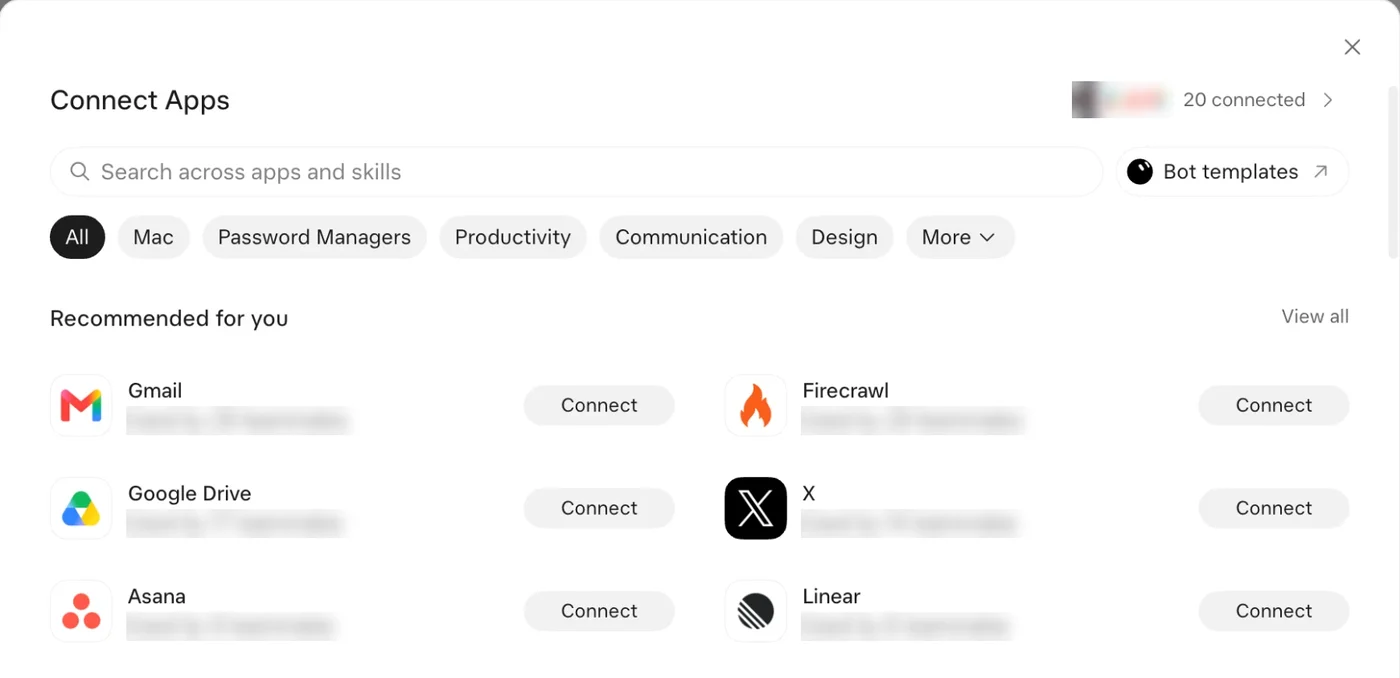
Connect your Firecrawl account
Grok Bot opens Firecrawl in your browser. Sign in, choose a team with Alexandria enabled, and select Authorize. The screen names Cursor, because the plugin is published on the Cursor Marketplace. No account yet? You can create one for free in the same flow.
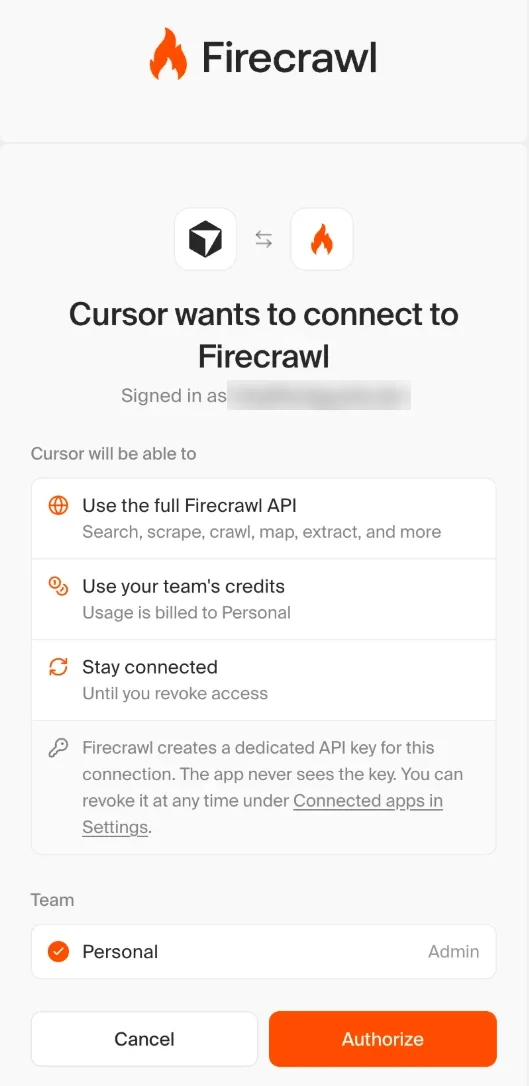
Ask your Bot for the data
In a chat, ask in plain language and mention Montana State Library MSDI framework layers or Firecrawl Alexandria. To make sure the Bot uses Firecrawl, type @ and choose Firecrawl first. For example:
Use Firecrawl to answer this: When were the Gallatin County parcels last republished and how big is the shapefile download?
What can Grok Bot do with Montana State Library MSDI framework layers?
Montana Spatial Data Infrastructure (MSDI) framework layers from the Montana State Library: cadastral parcels with Department of Revenue assessment attributes, public lands, conservation easements, structures and address points, road centerlines and administrative boundaries. Bulk publication status (file URL, size, Last-Modified, ETag) from the ftpgeoinfo.msl.mt.gov IIS host; records from MSL's anonymous ArcGIS Online feature services (org qnjIrwR8z5Izc0ij) with a cursor pinned to the layer's dataLastEditDate, id lookups by PARCELID / NGUID / UniqueID / GlobalID, DateUpdate change filters for addresses and roads, and a constrained where-clause search. Land cover and hydrography are status-only.
Grok Bot can run any of Montana State Library MSDI framework layers's 5 capabilities through Alexandria. Each call is billed in Firecrawl credits on your Firecrawl team.
- Records changes: Addresses (structures and address points) or roads whose provider-maintained DateUpdate is later than `since`, as `DateUpdate > DATE 'YYYY-MM-DD'` (or `> TIMESTAMP` for a date-time), in keyset pages pinned to the layer's dataLastEditDate like records_list, optionally restricted to one county. Deletions are not reported (the publisher keeps no changelog). Parcels, easements, public lands and boundaries have no modified-since field, so they are not offered here: diff snapshots from records_list instead. Costs 5 Firecrawl credits per call.
- Records get: One record by the publisher's own id: parcels by PARCELID (the 17-character DOR geocode; every row carrying it is returned, multipart parcels included), addresses and roads by NGUID, conservation_easements by UniqueID, public_lands and boundaries:<id> by GlobalID. Attribute-only. Fails with not_found when no row carries the id. Costs 5 Firecrawl credits per call.
- Records list: The current records of one layer, in 2,000-row pages (1,000 for addresses) ordered by OBJECTID with a keyset cursor (`OBJECTID > last`) pinned to the layer's editingInfo.dataLastEditDate. Every page re-reads the layer document and fails with invalid_input / `publication_changed` when the pin moved, so pages from two publications are never mixed. parcels, addresses and roads are segmented by county (segment key: CountyName / County / County_L); conservation_easements, public_lands and boundaries:<id> list statewide. Attribute-only (no geometry). Every record carries source_record_id, source_url, publication_id and retrieved_at; parcel owner fields are grouped under `owner` with the MCA 2-6-1017 notice and can be excluded. Costs 5 Firecrawl credits per call.
- Search: Per-query search on one record layer with a constrained ArcGIS SQL where clause (field comparisons, LIKE, AND/OR; no statements, comments or subqueries), e.g. "PropType = 'Vacant Land' AND TotalAcres > 100" on parcels or "St_Name = 'Main' AND Post_Comm = 'Bozeman'" on addresses, optionally within one county segment, paged with the same pinned keyset cursor as records_list. A where clause the server rejects (unknown field, bad syntax) fails with invalid_input. Zero matches is a valid empty page. Costs 5 Firecrawl credits per call.
- Source status: Cheap version check for one MSDI layer: the ArcGIS layer's publication pin (editingInfo.dataLastEditDate as publication_id and published_at), maxRecordCount, the returnCountOnly record count (for parcels optionally one county), and the bulk publication files on ftpgeoinfo.msl.mt.gov from the theme folder's IIS listing with HEAD Content-Length, Last-Modified and ETag (the publisher posts no hashes; the ETag is the file's version). Layers: parcels, public_lands, conservation_easements, addresses, roads, boundaries:<layer id>, and the status-only land_cover and hydrography. Most files exceed the 32 MiB runner cap, so this is the hand-off: URL, size and ETag. Costs 5 Firecrawl credits per call.
What should I ask Grok Bot?
Name Montana State Library MSDI framework layers or Firecrawl Alexandria in the prompt so Grok Bot reaches for it.
- Use Firecrawl to answer this: When were the Gallatin County parcels last republished and how big is the shapefile download?
- Use Firecrawl to list every Gallatin County parcel with owner, assessed values and acres.
- Use Firecrawl to look up parcel 06100534101010000 in the Montana cadastral layer.
- Use Firecrawl to answer this: Which Montana address points changed since 2026-06-01?
Troubleshooting
Why doesn't my Bot use Montana State Library MSDI framework layers?
Attach Firecrawl to the chat with @ before you ask, and name Montana State Library MSDI framework layers or Firecrawl Alexandria in the prompt.
Add to Grok Bot doesn't open the app. What should I do?
Install the Grok Bot desktop app first, or open Connect apps in Grok Bot and search for Firecrawl.
Use Montana State Library MSDI framework layers in other AI apps
The same Firecrawl account reaches Montana State Library MSDI framework layers from other AI apps. Pick one for its setup steps:
- Montana State Library MSDI framework layers in ChatGPT
- Montana State Library MSDI framework layers in Claude
- Montana State Library MSDI framework layers in Cursor
 Montana State Library MSDI framework layers in Muse
Other data providers you can connect to Grok Bot
Frequently Asked Questions
What is Firecrawl?
Firecrawl is the web data API to search, scrape and interact with the web at scale. It turns websites into clean, LLM-ready data for AI agents and apps. The Firecrawl plugin brings those tools into Grok Bot, along with every data provider in Firecrawl Alexandria.
What is Firecrawl Alexandria?
Firecrawl Alexandria is Firecrawl's library of 550+ data providers for AI agents, Montana State Library MSDI framework layers among them. Each provider returns structured data through documented capabilities. Grok Bot finds the capability that fits your question and calls it through the Firecrawl plugin, so you don't write any integration code. Alexandria needs a Firecrawl account signed in on a team with Alexandria enabled, or an API key from such a team; keyless connections don't include it.
Is there a Montana State Library MSDI framework layers MCP server for Grok Bot?
Grok Bot reaches Montana State Library MSDI framework layers through Firecrawl's hosted MCP server, which serves Montana State Library MSDI framework layers and every other Alexandria provider as tools. Add the Firecrawl plugin once and you don't install or host a separate MCP server for Montana State Library MSDI framework layers.
What does connecting Montana State Library MSDI framework layers to Grok Bot unlock?
Grok Bot can run all 5 of Montana State Library MSDI framework layers's capabilities, including Records changes, Records get and Records list, from any chat, with structured results it can sort, compare and summarize. For example, ask: "Use Firecrawl to answer this: When were the Gallatin County parcels last republished and how big is the shapefile download?" In the same conversation, Grok Bot can combine Montana State Library MSDI framework layers with Firecrawl's web search and scraping and the other providers in Firecrawl Alexandria.
Do I need my own Montana State Library MSDI framework layers account or API key to use it in Grok Bot?
No. Grok Bot calls Montana State Library MSDI framework layers through Firecrawl Alexandria and each call is billed in Firecrawl credits, so you don't need a separate Montana State Library MSDI framework layers account or API key.
How much does it cost to use Montana State Library MSDI framework layers in Grok Bot?
Each Montana State Library MSDI framework layers call costs 5 Firecrawl credits. The capability list on this page shows each price and its unit. The credits come from the Firecrawl team you connect to Grok Bot, and finding the right capability is free.
Can Grok Bot use other providers besides Montana State Library MSDI framework layers?
Yes. The same Firecrawl plugin reaches every provider in Firecrawl Alexandria, along with Firecrawl's web search and scraping, so you connect once.
Can I use Montana State Library MSDI framework layers in other AI apps?
Yes. Connect Firecrawl to ChatGPT, Claude, Cursor, Muse signed in on a Firecrawl team with Alexandria enabled, or use the Firecrawl MCP server, CLI or API with an API key from that team, and the same Montana State Library MSDI framework layers capabilities are available there. Keyless connections don't include Alexandria.