How to connect Hipcamp to Grok Bot
Add the Firecrawl plugin to Grok Bot once and it can call the Hipcamp API and every other provider in Firecrawl Alexandria, with no Hipcamp integration code.
To connect Hipcamp to Grok Bot, add the Firecrawl plugin to Grok Bot, sign in on a Firecrawl team with Alexandria enabled, and ask for Hipcamp data in plain language. The connection works in every Bot in your Grok Bot account, and you set it up once.
Grok Bot uses Hipcamp as an MCP tool through Firecrawl's hosted MCP server, so you don't install or host a separate MCP server for Hipcamp.
Grok Bot is xAI's agent app. Plugins give your Bots outside tools, and the Firecrawl plugin adds web search, scraping and every data provider in Firecrawl Alexandria.
How do I connect Hipcamp to Grok Bot?
Add the Firecrawl plugin
In Grok Bot, open Connect apps from the sidebar, find Firecrawl and select Connect. You can also open Firecrawl's plugin listing and select Add to Grok Bot, which opens the desktop app to finish the install.
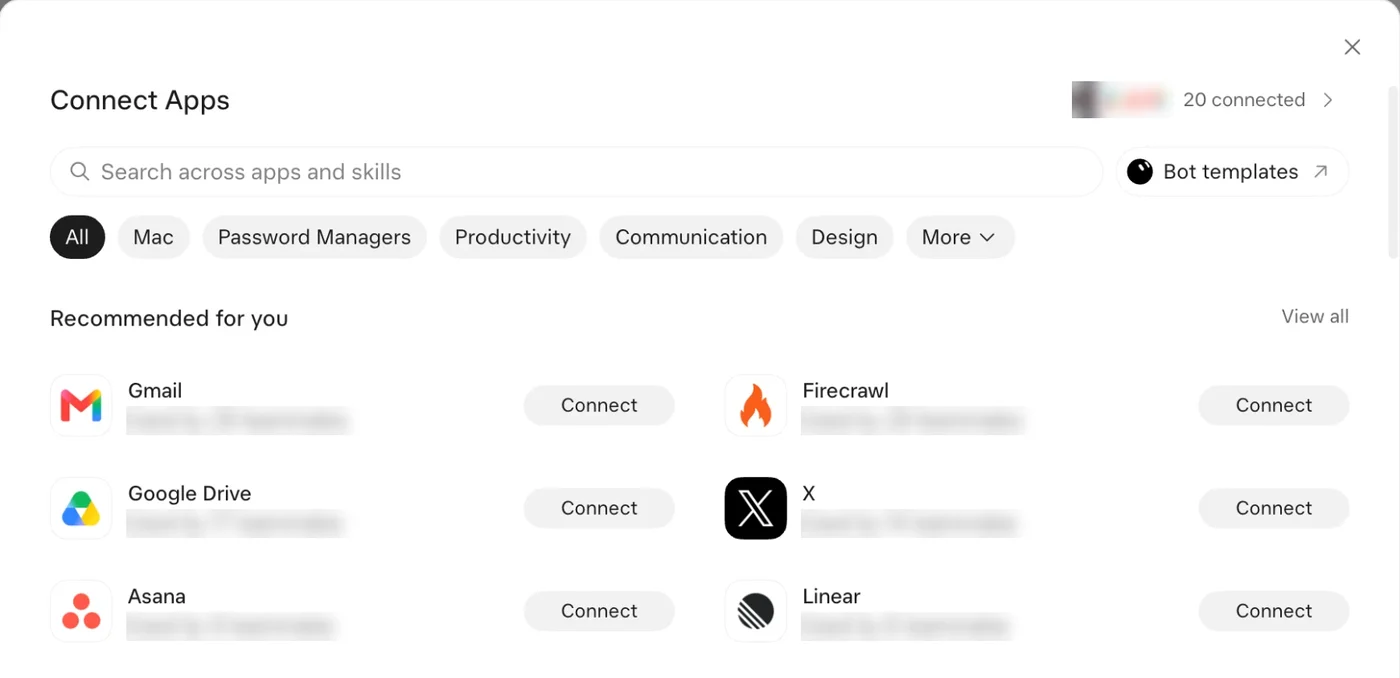
Connect your Firecrawl account
Grok Bot opens Firecrawl in your browser. Sign in, choose a team with Alexandria enabled, and select Authorize. The screen names Cursor, because the plugin is published on the Cursor Marketplace. No account yet? You can create one for free in the same flow.
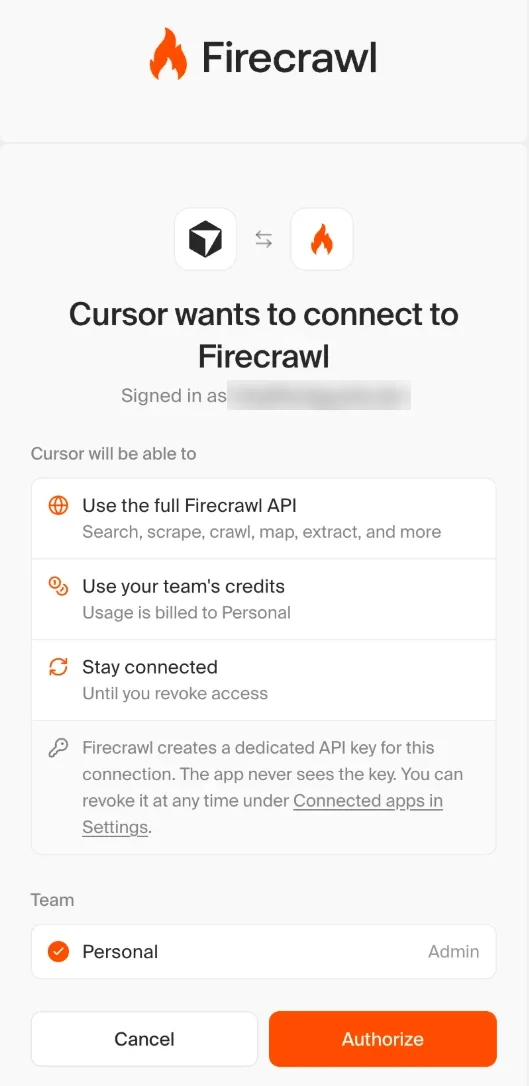
Ask your Bot for the data
In a chat, ask in plain language and mention Hipcamp or Firecrawl Alexandria. To make sure the Bot uses Firecrawl, type @ and choose Firecrawl first. For example:
Use Firecrawl to find Hipcamp place and public campground suggestions matching Yosemite, with coordinates and listing IDs.
What can Grok Bot do with Hipcamp?
Hipcamp campsite, cabin, glamping and RV listing discovery: dated search with location, group size and amenity filters, land details, per-site availability and displayed price quotes, blocked-date calendars, reviews, place autocomplete and public campground daily availability. Anonymous, read-only.
Grok Bot can run any of Hipcamp's 7 capabilities through Alexandria. Each call is billed in Firecrawl credits on your Firecrawl team.
- Autocomplete: Hipcamp place and listing suggestions for a typed term: regions, cities, public areas (national/state parks, points of interest), private lands (park_private, with masked_id) and public campgrounds (campground_public, with the numeric id public_campground_availability needs), each with coordinates and the site URL. Costs 5 Firecrawl credits per call.
- Land: Details for one Hipcamp land (a host's property with one or more bookable sites): name, location, overview, host, amenities, review summaries, policies, sites with undated one-night price estimates and the minimum displayed nightly price with its ISO currency. Costs 5 Firecrawl credits per call.
- Land calendar: Blocked dates for a land (reserved days with the affected site ids and closed-to-arrival/departure flags) or, with site_id, for one site (blocked_for_booking per date). Lists blocked dates only: a date absent from the list is not a confirmed availability; use land_sites for a dated check. Costs 5 Firecrawl credits per call.
- Land reviews: Public camper reviews for a land, newest first, 30 per page with cursor pagination: title, text, recommend verdict, display date, reviewer display name, site stayed at, trip details and the host's public reply. Costs 5 Firecrawl credits per call.
- Land sites: Per-site availability and Hipcamp's displayed price quote for one land and a stay: for each site whether it is available for the dates and party, the number of available sites, booking restrictions, minimum nights, and the itemised quote (nightly price, cleaning fee, service fee and tax, occupancy tax, extra fees, total). Quotes are as displayed at observation time, not confirmed bookings. Without dates, is_available is null and the quote is a one-night estimate. Costs 5 Firecrawl credits per call.
- Public campground availability: Daily availability Hipcamp shows for a public (government-run) campground over a date window: per date the status (AVAILABLE, CLOSED or UNKNOWN) and the number of available campsites. Public campgrounds are external inventory (recreation.gov, state systems); UNKNOWN is common and no prices are shown. Costs 5 Firecrawl credits per call.
- Search lands: Search Hipcamp private lands (campsites, cabins, glamping, RV sites) around a coordinate or inside a map bounding box, optionally for dates, party size, pets, amenity and accommodation filters. Each result carries the land's identity, location, review counts and, for dated searches, Hipcamp's displayed price quote with itemised fees and taxes. Prices are quotes as displayed, not confirmed bookings; ranking jitters slightly between calls, so dedupe by masked_id when aggregating pages. Costs 5 Firecrawl credits per call.
What should I ask Grok Bot?
Name Hipcamp or Firecrawl Alexandria in the prompt so Grok Bot reaches for it.
- Use Firecrawl to find Hipcamp place and public campground suggestions matching Yosemite, with coordinates and listing IDs.
- Use Firecrawl to find five tent-camping lands near Yosemite at 37.8651, -119.5405 for two adults and one dog for two nights starting 30 days from today, with displayed itemised stay quotes.
- Use Firecrawl to find three tent-camping lands near Yosemite at 37.8651, -119.5405, then show the first land’s amenities, policies and site descriptions.
- Use Firecrawl to find three Hipcamp lands near Yosemite at 37.8651, -119.5405, then show the first land’s latest public camper review page and host replies.
Troubleshooting
Why doesn't my Bot use Hipcamp?
Attach Firecrawl to the chat with @ before you ask, and name Hipcamp or Firecrawl Alexandria in the prompt.
Add to Grok Bot doesn't open the app. What should I do?
Install the Grok Bot desktop app first, or open Connect apps in Grok Bot and search for Firecrawl.
Use Hipcamp in other AI apps
The same Firecrawl account reaches Hipcamp from other AI apps. Pick one for its setup steps:

Other data providers you can connect to Grok Bot
Frequently Asked Questions
What is Firecrawl?
Firecrawl is the web data API to search, scrape and interact with the web at scale. It turns websites into clean, LLM-ready data for AI agents and apps. The Firecrawl plugin brings those tools into Grok Bot, along with every data provider in Firecrawl Alexandria.
What is Firecrawl Alexandria?
Firecrawl Alexandria is Firecrawl's library of 550+ data providers for AI agents, Hipcamp among them. Each provider returns structured data through documented capabilities. Grok Bot finds the capability that fits your question and calls it through the Firecrawl plugin, so you don't write any integration code. Alexandria needs a Firecrawl account signed in on a team with Alexandria enabled, or an API key from such a team; keyless connections don't include it.
Is there a Hipcamp MCP server for Grok Bot?
Grok Bot reaches Hipcamp through Firecrawl's hosted MCP server, which serves Hipcamp and every other Alexandria provider as tools. Add the Firecrawl plugin once and you don't install or host a separate MCP server for Hipcamp.
What does connecting Hipcamp to Grok Bot unlock?
Grok Bot can run all 7 of Hipcamp's capabilities, including Autocomplete, Land and Land calendar, from any chat, with structured results it can sort, compare and summarize. For example, ask: "Use Firecrawl to find Hipcamp place and public campground suggestions matching Yosemite, with coordinates and listing IDs." In the same conversation, Grok Bot can combine Hipcamp with Firecrawl's web search and scraping and the other providers in Firecrawl Alexandria.
Do I need my own Hipcamp account or API key to use it in Grok Bot?
No. Grok Bot calls Hipcamp through Firecrawl Alexandria and each call is billed in Firecrawl credits, so you don't need a separate Hipcamp account or API key.
How much does it cost to use Hipcamp in Grok Bot?
Each Hipcamp call costs 5 Firecrawl credits. The capability list on this page shows each price and its unit. The credits come from the Firecrawl team you connect to Grok Bot, and finding the right capability is free.
Can Grok Bot use other providers besides Hipcamp?
Yes. The same Firecrawl plugin reaches every provider in Firecrawl Alexandria, along with Firecrawl's web search and scraping, so you connect once.
Can I use Hipcamp in other AI apps?
Yes. Connect Firecrawl to ChatGPT, Claude, Cursor, Muse signed in on a Firecrawl team with Alexandria enabled, or use the Firecrawl MCP server, CLI or API with an API key from that team, and the same Hipcamp capabilities are available there. Keyless connections don't include Alexandria.