How to connect Hunter to Cursor
Add the Firecrawl MCP server to Cursor once and it can call the Hunter API and every other provider in Firecrawl Alexandria, with no Hunter integration code.
To connect Hunter to Cursor, add the Firecrawl MCP server to Cursor, sign in on a Firecrawl team with Alexandria enabled, and ask for Hunter data in plain language. The connection works in Cursor's agent and chat, and you set it up once.
Cursor uses Hunter as an MCP tool through Firecrawl's hosted MCP server, so you don't install or host a separate MCP server for Hunter.
Cursor is an AI code editor. Its agent uses MCP servers for outside tools, and the Firecrawl MCP server adds web search, scraping and every data provider in Firecrawl Alexandria.
How do I connect Hunter to Cursor?
Install the Firecrawl MCP server
Open the install dialog in Cursor, check that the URL is Firecrawl's hosted server, then select Install.
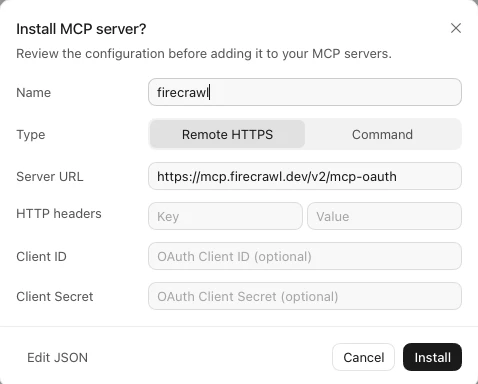
Connect your Firecrawl account
Use the server's sign-in option in Cursor's MCP settings. Firecrawl opens in your browser: sign in, choose a team with Alexandria enabled, and approve access. A green dot next to Firecrawl means it's connected.
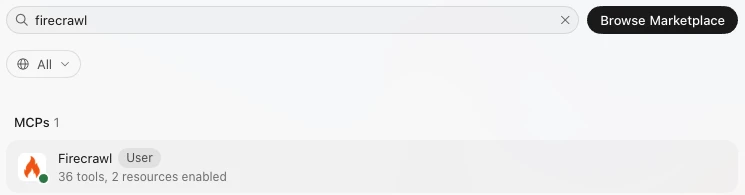
Ask Cursor's agent for the data
In the agent chat, ask in plain language and mention Hunter or Firecrawl Alexandria. The agent finds the Hunter capability that fits and runs it. For example:
Use Firecrawl to find the work email for Patrick Collison at stripe.com and include the confidence score and whether the address was found or inferred.
What can Cursor do with Hunter?
Find a work email, verify an address, list addresses at a company, and enrich a person or company.
Cursor can run any of Hunter's 5 capabilities through Alexandria. Each call is billed in Firecrawl credits on your Firecrawl team.
- Email finder: One person, under data. email is null when nothing was found, and that call costs nothing. score is Hunter's confidence. provenance is found, inferred, or a later value. verification.status is valid, accept_all, or unknown. sources lists up to 20 public pages. meta.params echoes the query. Costs 10 Firecrawl credits per record.
- Email verifier: One verification under data. status is the detailed result. score is the deliverability score. regexp, gibberish, disposable, webmail, mx_records, smtp_server, smtp_check, accept_all, and block are the individual checks. verification is the date and status, or null when no SMTP check ran. sources lists up to 20 public pages. meta.params echoes the email. Costs 6 Firecrawl credits per call.
- Person enrichment: One person under data. name has fullName, givenName, and familyName. employment has domain, name, title, role, and seniority. geo has city, state, country, and countryCode. linkedin.handle is the profile slug. meta.email echoes the query when an email was sent. Costs 3 Firecrawl credits per record.
- Company emails: One company under data. emails is the page of addresses. Each address has value, type (personal or generic), provenance, confidence, sources, first_name, last_name, position, seniority, department, decision_maker, linkedin, twitter, phone_number, and verification. domain, pattern, and organization are null when Hunter has no domain. meta.results is the count, meta.results_approximate says whether that count is capped, and meta.limit and meta.offset echo the page. meta.aggregations is present only when aggregations was true. Costs 10 Firecrawl credits per record.
- Company enrichment: One company under data. category holds the industry classification. geo holds headquarters. metrics.employees is a range and metrics.employeesCount is a number. tech is the technology slug list. meta.domain echoes the query. Costs 3 Firecrawl credits per record.
What should I ask Cursor?
Name Hunter or Firecrawl Alexandria in the prompt so Cursor reaches for it. Each example opens in Cursor with the prompt filled in.
- Use Firecrawl to find the work email for Patrick Collison at stripe.com and include the confidence score and whether the address was found or inferred.
- Use Firecrawl to check whether steli@close.io is deliverable and report the verification status, score, and SMTP check.
- Use Firecrawl to list the personal email addresses Hunter has at stripe.com, with each person's name, title, and confidence.
- Use Firecrawl to enrich the company behind hunter.io and show its industry, description, headquarters, and employee count.
Troubleshooting
Why can't Cursor find Hunter?
If Firecrawl's tools in Cursor stop at search, scrape and parse, the connection is keyless and doesn't include Alexandria. Finish the sign-in from Cursor's MCP settings, or add an API key from a team with Alexandria enabled.
Firecrawl shows a red dot in Cursor. What should I do?
Open Cursor's MCP settings, sign in to Firecrawl again, and restart the agent chat so it loads the tools.
Use Hunter in other AI apps
The same Firecrawl account reaches Hunter from other AI apps. Pick one for its setup steps:

Other data providers you can connect to Cursor
Frequently Asked Questions
What is Firecrawl?
Firecrawl is the web data API to search, scrape and interact with the web at scale. It turns websites into clean, LLM-ready data for AI agents and apps. The Firecrawl MCP server brings those tools into Cursor, along with every data provider in Firecrawl Alexandria.
What is Firecrawl Alexandria?
Firecrawl Alexandria is Firecrawl's library of 550+ data providers for AI agents, Hunter among them. Each provider returns structured data through documented capabilities. Cursor finds the capability that fits your question and calls it through the Firecrawl MCP server, so you don't write any integration code. Alexandria needs a Firecrawl account signed in on a team with Alexandria enabled, or an API key from such a team; keyless connections don't include it.
Is there a Hunter MCP server for Cursor?
Cursor reaches Hunter through Firecrawl's hosted MCP server, which serves Hunter and every other Alexandria provider as tools. Add the Firecrawl MCP server once and you don't install or host a separate MCP server for Hunter.
What does connecting Hunter to Cursor unlock?
Cursor can run all 5 of Hunter's capabilities, including Email finder, Email verifier and Person enrichment, from any chat, with structured results it can sort, compare and summarize. For example, ask: "Use Firecrawl to find the work email for Patrick Collison at stripe.com and include the confidence score and whether the address was found or inferred." In the same conversation, Cursor can combine Hunter with Firecrawl's web search and scraping and the other providers in Firecrawl Alexandria.
Do I need my own Hunter account or API key to use it in Cursor?
No. Cursor calls Hunter through Firecrawl Alexandria and each call is billed in Firecrawl credits, so you don't need a separate Hunter account or API key.
How much does it cost to use Hunter in Cursor?
Hunter calls cost from 3 to 10 Firecrawl credits per billed unit, depending on the capability and how much data it returns. The capability list on this page shows each price and its unit. The credits come from the Firecrawl team you connect to Cursor, and finding the right capability is free.
Can Cursor use other providers besides Hunter?
Yes. The same Firecrawl MCP server reaches every provider in Firecrawl Alexandria, along with Firecrawl's web search and scraping, so you connect once.
Can I use Hunter in other AI apps?
Yes. Connect Firecrawl to ChatGPT, Claude, Grok Bot, Muse signed in on a Firecrawl team with Alexandria enabled, or use the Firecrawl MCP server, CLI or API with an API key from that team, and the same Hunter capabilities are available there. Keyless connections don't include Alexandria.