How to connect Rover to ChatGPT
Add the Firecrawl plugin to ChatGPT once and it can call the Rover API and every other provider in Firecrawl Alexandria, with no Rover integration code.
To connect Rover to ChatGPT, add the Firecrawl plugin to ChatGPT, sign in on a Firecrawl team with Alexandria enabled, and ask for Rover data in plain language. The connection works in ChatGPT and Codex, and you set it up once.
ChatGPT uses Rover as an MCP tool through Firecrawl's hosted MCP server, so you don't install or host a separate MCP server for Rover.
ChatGPT is OpenAI's AI assistant. Plugins add tools from other services, and the Firecrawl plugin adds web search, scraping and every data provider in Firecrawl Alexandria.
How do I connect Rover to ChatGPT?
Install the Firecrawl plugin
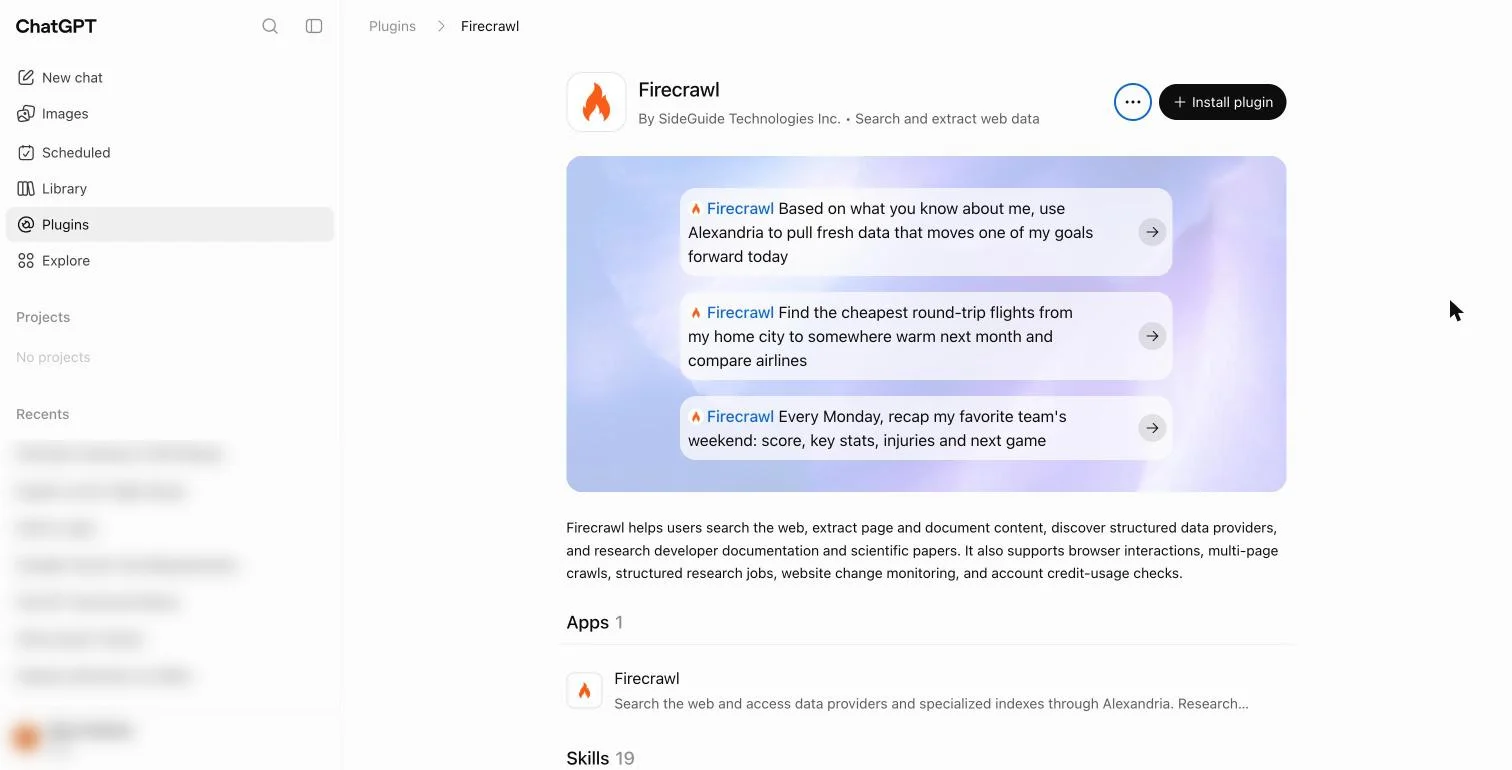
Open the Firecrawl listing in ChatGPT's plugin directory and select Install plugin. You can also open Plugins in ChatGPT or Codex and search for Firecrawl.
Connect your Firecrawl account
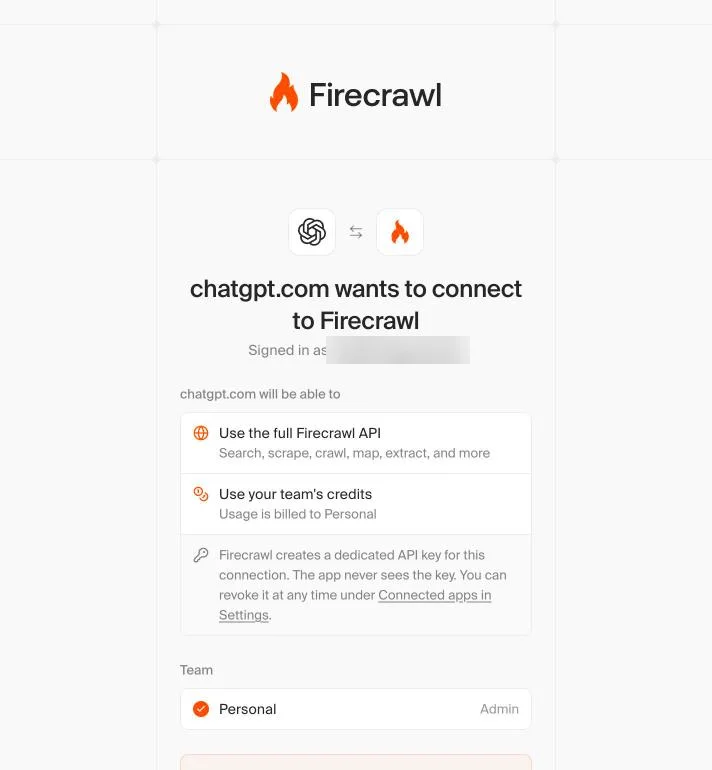
ChatGPT opens Firecrawl in your browser. Sign in, choose a team with Alexandria enabled, and approve access. No account yet? You can create one for free in the same flow.
Attach Firecrawl to a chat
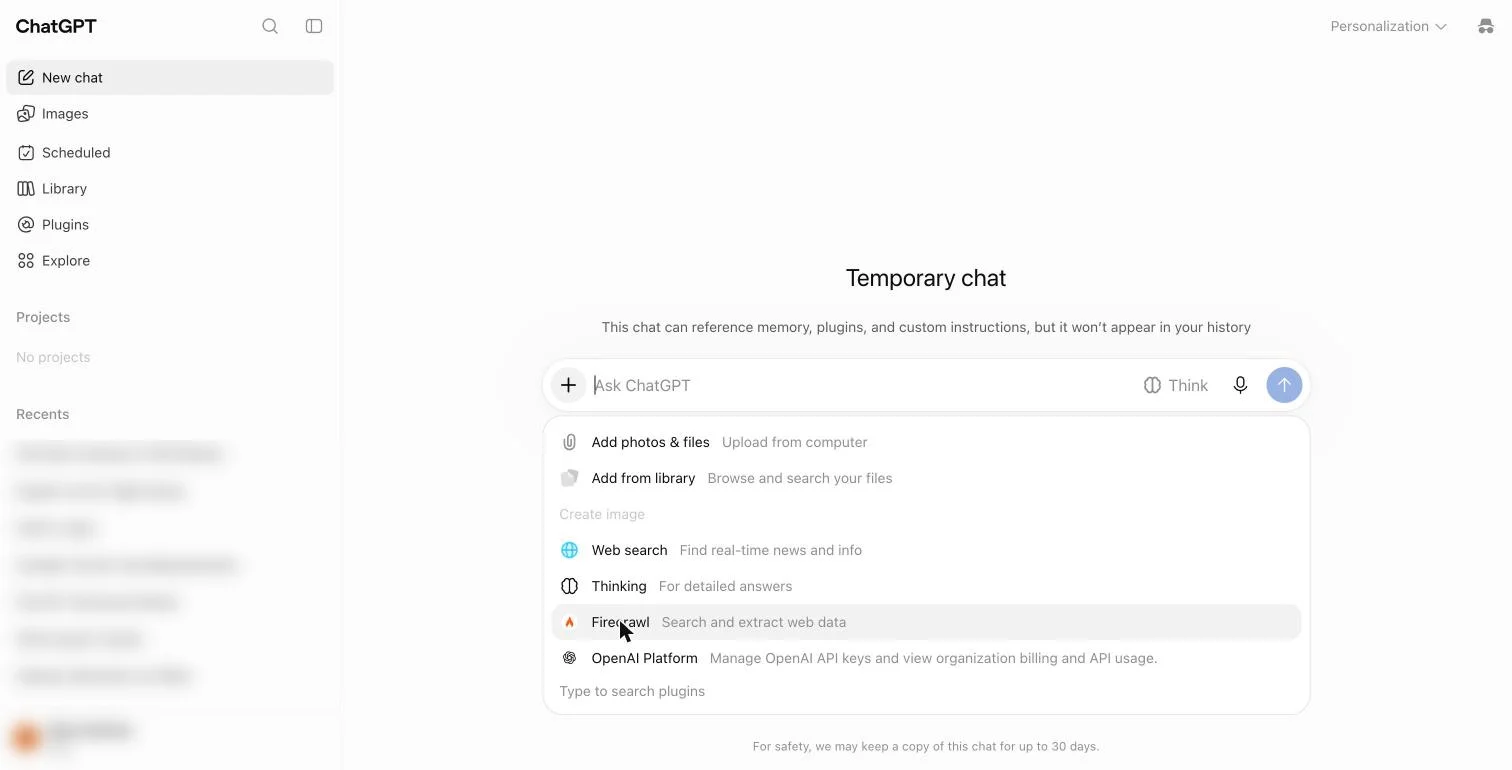
Start a new chat so it loads the plugin, open the + menu and choose Firecrawl. You can also ask ChatGPT to use Firecrawl by name.
Ask ChatGPT for the data
Ask in plain language and mention Rover or Firecrawl Alexandria. ChatGPT finds the Rover capability that fits and runs it. For example:
Use Firecrawl to find the first page of dog-boarding sitters in Seattle, WA, USA for October 20–23, 2026, with listed nightly prices and ratings.
What can ChatGPT do with Rover?
Rover public pet-care discovery without an account: search sitters by service (boarding, house sitting, drop-in visits, dog walking, doggy day care), location, dates, dog size and price; read a sitter's public profile with every listed rate (sitter rate and the full price including Rover's owner-side service fee), acceptance rules and cancellation policy; read the sitter's public availability calendar for a date window; list the sitter's reviews; and resolve free-text places to the location strings the search accepts. Source: the www.rover.com /api/v7/ JSON API the website calls anonymously. US market from a US ISP exit (country and currency follow the request IP); prices are sitter-listed advertised rates in USD, not quotes; availability is what the sitter listed, not a booking guarantee.
ChatGPT can run any of Rover's 5 capabilities through Alexandria. Each call is billed in Firecrawl credits on your Firecrawl team.
- Get sitter: Read one sitter's public profile by profile `slug` or profile `url` (`GET /api/v7/people/full-sitter-profile/?slug=`, endpoint ep-full-profile). Returns identity (opk, slug, short name), profile texts, ratings and review counts, responsiveness, member-since date, badges, home attributes, and every active service with its listed rates: for each add-on rate (standard, holiday, additional dog, puppy, cat care, ...) both `price` (the sitter's listed rate) and `full_price` (that rate plus Rover's owner-side service fee as Rover displays it), the unit (night, visit, walk, day), which dog sizes and cats the service accepts, spaces, whether new customers are accepted, and the cancellation policy. Rates are advertised prices, not quotes: holiday adjustments and taxes are not included. Unknown slug is `not_found`. Costs 5 Firecrawl credits per call.
- Get sitter availability: Read a sitter's public availability calendar for one service over a date window (`GET /api/v7/people/{opk}/public-calendar/`, endpoint ep-calendar). Input `opk` from a search result or `get_sitter`, the service slug, and `start_date`/`end_date` (default: today through six weeks ahead, at most 120 days). Returns the sitter's calendar preferences (spaces, days of week, away flag) and one entry per day with `spaces_available`/`spaces_occupied` per calendar, plus `updated_at` (when the sitter last updated the calendar) and a count of days with at least one space. This is sitter-listed availability, not a booking guarantee. Unknown opk is `not_found`. Costs 5 Firecrawl credits per call.
- List sitter reviews: List one sitter's public reviews, newest first, one page at a time (`GET /api/v7/people/{opk}/reviews/?page=`, endpoint ep-reviews). Returns the rating distribution and totals (ratings vs. text reviews), and per review: id, timestamp with offset as Rover stores it, star rating, text, reviewer short name, the service reviewed, the pets, and the sitter's response when any. `next_page` (and the continuation) is null when exhausted. Unknown opk is `not_found`. Costs 5 Firecrawl credits per call.
- Search sitters: Search Rover sitters for one service around a location (`GET /api/v7/search-optimized/`, endpoint ep-search-api). Filters: `service_type` (overnight-boarding = boarding in the sitter's home, overnight-traveling = house sitting in the owner's home, drop-in = drop-in visits, dog-walking, doggy-day-care), `location` as a free-text place (use the exact `description` from `suggest_locations`, e.g. `Seattle, WA, USA`), `pet_type` dog or cat, optional `start_date`/`end_date`, dog-size flags, `min_price`/`max_price` and `page` (20 results per page; `next_page` and the continuation give the next one). Each result is a sitter card: opk and slug (the identifiers `get_sitter`, `get_sitter_availability` and `list_sitter_reviews` take), name, headline, listed price per unit in the market currency, rating and review counts, neighbourhood and distance from the search centre, badges, and `available_for_selected_dates` exactly as Rover reports it (`unknown` is a real value: search results never confirm availability; use `get_sitter_availability`). The response `location` block says what Rover geocoded the input to. A location Rover cannot geocode makes it fall back to the request IP's area; this program refuses that with `invalid_input` instead of returning unrelated sitters. Market follows the proxy exit (US, USD); a non-US location therefore also fails as not resolvable. Costs 5 Firecrawl credits per call.
- Suggest locations: Resolve free text to the place strings Rover's search accepts (`GET /api/v7/utilities/location-autocomplete/`, endpoint ep-autocomplete). Returns Rover's place predictions (Google Places-backed): `description` is the exact `location` value to pass to `search_sitters`, with main/secondary text, place id and place types. An empty list with status ZERO_RESULTS is a legitimate no-match. Costs 5 Firecrawl credits per call.
What should I ask ChatGPT?
Name Rover or Firecrawl Alexandria in the prompt so ChatGPT reaches for it. Each example opens in ChatGPT with the prompt filled in.
- Use Firecrawl to find the first page of dog-boarding sitters in Seattle, WA, USA for October 20–23, 2026, with listed nightly prices and ratings.
- Use Firecrawl to read Rover sitter tianci-d-staycation-for-your-dog and show active services, listed rates with owner service fees and cancellation policies.
- Use Firecrawl to find the first Seattle dog-boarding sitter and read their boarding availability calendar for October 20–23, 2026, including available spaces and last update.
- Use Firecrawl to run Rover's Get sitter capability. Inspect the Alexandria inputs, ask for any missing required details, and return a small sample with sources.
Troubleshooting
Why doesn't ChatGPT use Rover?
Start a new chat after installing so ChatGPT loads the plugin, then attach Firecrawl from the + menu and name Rover or Firecrawl Alexandria in the prompt.
How do I switch the Firecrawl team ChatGPT uses?
Open the Firecrawl plugin page in ChatGPT, uninstall it from the menu next to Settings, then install it again and choose the other team on Firecrawl's consent screen.
Why does ChatGPT say Rover isn't available?
Alexandria needs a Firecrawl team with Alexandria enabled. Reinstall the plugin and pick that team when you approve access.
Use Rover in other AI apps
The same Firecrawl account reaches Rover from other AI apps. Pick one for its setup steps:

Other data providers you can connect to ChatGPT
Frequently Asked Questions
What is Firecrawl?
Firecrawl is the web data API to search, scrape and interact with the web at scale. It turns websites into clean, LLM-ready data for AI agents and apps. The Firecrawl plugin brings those tools into ChatGPT, along with every data provider in Firecrawl Alexandria.
What is Firecrawl Alexandria?
Firecrawl Alexandria is Firecrawl's library of 550+ data providers for AI agents, Rover among them. Each provider returns structured data through documented capabilities. ChatGPT finds the capability that fits your question and calls it through the Firecrawl plugin, so you don't write any integration code. Alexandria needs a Firecrawl account signed in on a team with Alexandria enabled, or an API key from such a team; keyless connections don't include it.
Is there a Rover MCP server for ChatGPT?
ChatGPT reaches Rover through Firecrawl's hosted MCP server, which serves Rover and every other Alexandria provider as tools. Add the Firecrawl plugin once and you don't install or host a separate MCP server for Rover.
What does connecting Rover to ChatGPT unlock?
ChatGPT can run all 5 of Rover's capabilities, including Get sitter, Get sitter availability and List sitter reviews, from any chat, with structured results it can sort, compare and summarize. For example, ask: "Use Firecrawl to find the first page of dog-boarding sitters in Seattle, WA, USA for October 20–23, 2026, with listed nightly prices and ratings." In the same conversation, ChatGPT can combine Rover with Firecrawl's web search and scraping and the other providers in Firecrawl Alexandria.
Do I need my own Rover account or API key to use it in ChatGPT?
No. ChatGPT calls Rover through Firecrawl Alexandria and each call is billed in Firecrawl credits, so you don't need a separate Rover account or API key.
How much does it cost to use Rover in ChatGPT?
Each Rover call costs 5 Firecrawl credits. The capability list on this page shows each price and its unit. The credits come from the Firecrawl team you connect to ChatGPT, and finding the right capability is free.
Can ChatGPT use other providers besides Rover?
Yes. The same Firecrawl plugin reaches every provider in Firecrawl Alexandria, along with Firecrawl's web search and scraping, so you connect once.
Can I use Rover in other AI apps?
Yes. Connect Firecrawl to Claude, Cursor, Grok Bot, Muse signed in on a Firecrawl team with Alexandria enabled, or use the Firecrawl MCP server, CLI or API with an API key from that team, and the same Rover capabilities are available there. Keyless connections don't include Alexandria.