How to connect SpotHero parking to Grok Bot
Add the Firecrawl plugin to Grok Bot once and it can call the SpotHero parking API and every other provider in Firecrawl Alexandria, with no SpotHero parking integration code.
To connect SpotHero parking to Grok Bot, add the Firecrawl plugin to Grok Bot, sign in on a Firecrawl team with Alexandria enabled, and ask for SpotHero parking data in plain language. The connection works in every Bot in your Grok Bot account, and you set it up once.
Grok Bot uses SpotHero parking as an MCP tool through Firecrawl's hosted MCP server, so you don't install or host a separate MCP server for SpotHero parking.
Grok Bot is xAI's agent app. Plugins give your Bots outside tools, and the Firecrawl plugin adds web search, scraping and every data provider in Firecrawl Alexandria.
How do I connect SpotHero parking to Grok Bot?
Add the Firecrawl plugin
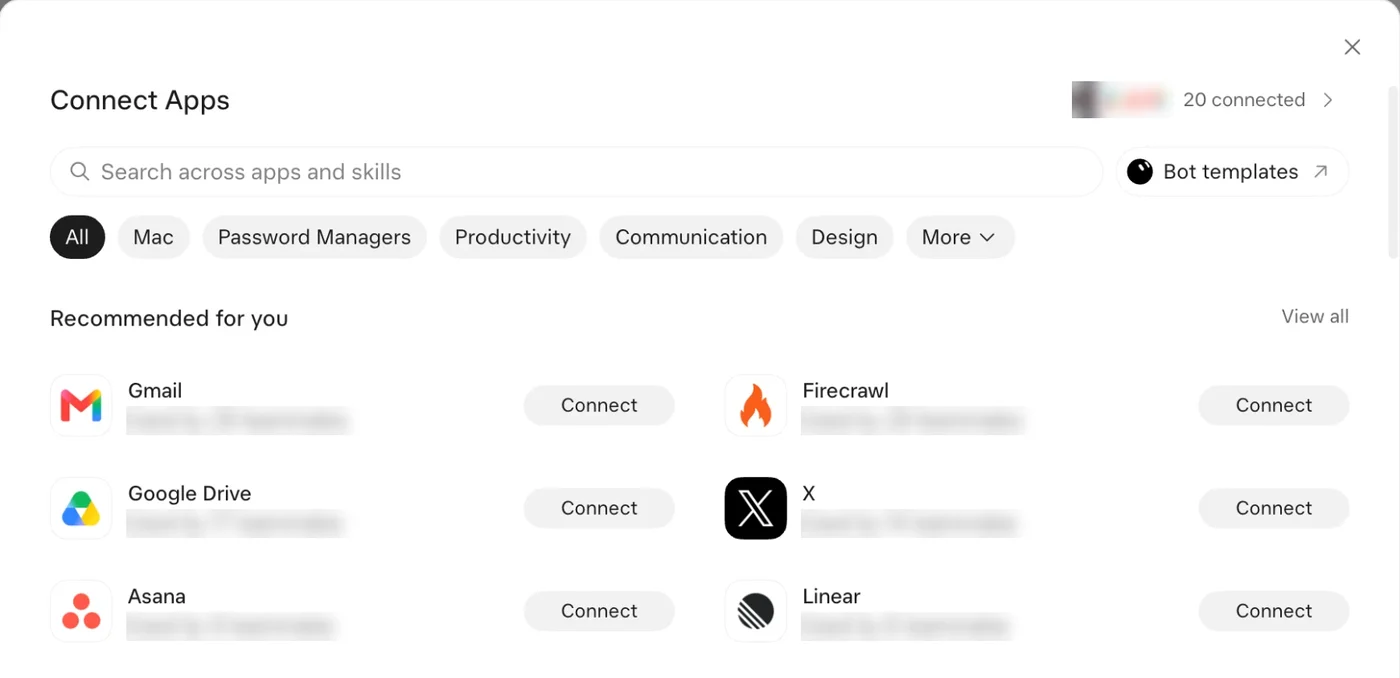
In Grok Bot, open Connect apps from the sidebar, find Firecrawl and select Connect. You can also open Firecrawl's plugin listing and select Add to Grok Bot, which opens the desktop app to finish the install.
Connect your Firecrawl account
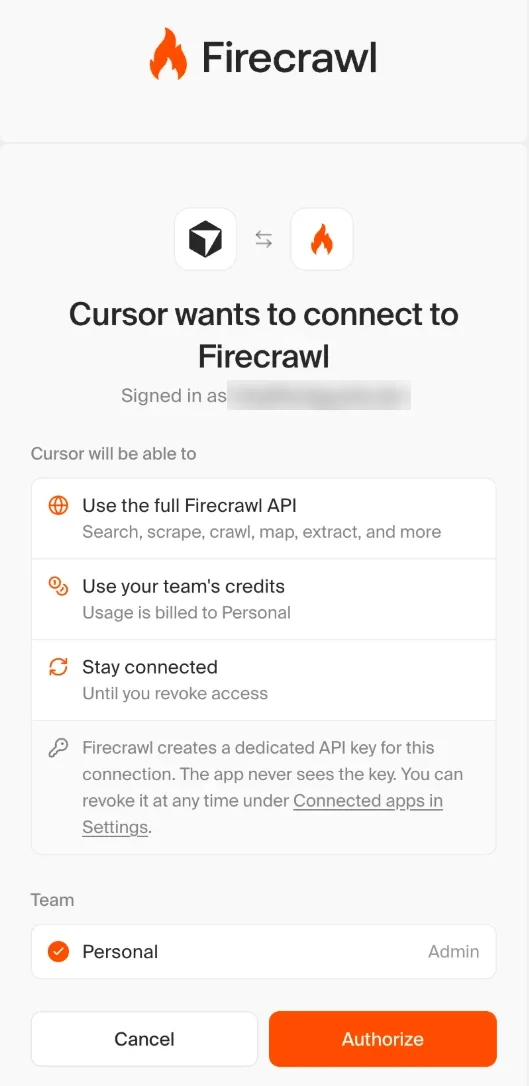
Grok Bot opens Firecrawl in your browser. Sign in, choose a team with Alexandria enabled, and select Authorize. The screen names Cursor, because the plugin is published on the Cursor Marketplace. No account yet? You can create one for free in the same flow.
Ask your Bot for the data
In a chat, ask in plain language and mention SpotHero parking or Firecrawl Alexandria. To make sure the Bot uses Firecrawl, type @ and choose Firecrawl first. For example:
Use Firecrawl to find the first five SpotHero parking options near latitude 41.881028, longitude -87.674154 for December 16, 2026, from 6 pm to 11 pm local time, with total charges and vehicle restrictions.
What can Grok Bot do with SpotHero parking?
SpotHero parking discovery and pricing for the US and Canada: hourly/daily, monthly and airport parking searches with itemised quotes for a time window, single-facility quotes, customer reviews, destinations (venue name search and per-id detail with typical price ranges), upcoming events, and the city and airport directories. Read-only: no holds, bookings or checkout.
Grok Bot can run any of SpotHero parking's 11 capabilities through Alexandria. Each call is billed in Firecrawl credits on your Firecrawl team.
- Airports: The airports SpotHero sells parking at (spothero.com/api/v1/airports/, ~110 in the US and Canada): IATA code, name, city, coordinates, time zone, destination id and the airport page URL. `query` filters by code, name or city (case-insensitive substring). Costs 5 Firecrawl credits per call.
- Cities: SpotHero's cities (spothero.com/api/v1/cities/, ~150 in the US and Canada): id, name, slug, coordinates, country code and the city parking page URL. With `latitude`/`longitude` the nearest cities are returned first (`limit`, default 5); without, the full list, optionally filtered by `query` on the name. Costs 5 Firecrawl credits per call.
- Destination: Read a SpotHero destination (venue, airport, neighbourhood) by id: title, address, coordinates, time zone, city slug and page URL (spothero.com/api/v1/destinations/{id}), plus SpotHero's average price ranges by rate category (commuter, overnight, weekend, event, monthly, airport) from api.spothero.com/v2/midfunnel-rates. Price ranges are advertised averages, not quotes for a window. An unknown id is `not_found`. Costs 5 Firecrawl credits per call.
- Destination events: List upcoming events at a destination (spothero.com/api/v1/events/?destination_id=), each with SpotHero's parking window (local time) and the event parking page URL, after resolving the destination (title, time zone). `starts` bounds the list (default: now, UTC). 25 events per page by default (`page_size` up to 150); `next_page` when SpotHero reports more. An unknown destination is `not_found`; a destination without events returns an empty list. Costs 5 Firecrawl credits per call.
- Facility quote: Quote one facility for an arrival/departure window (api.spothero.com/v2/search/transient/{facility_id}, the request behind a spot's detail panel): full facility record (address, hours, restrictions, vehicle limits, requirements, cancellation policy, images) with every rate priced for the window, itemised, plus availability. An unknown facility id is `not_found`. Costs 5 Firecrawl credits per call.
- Facility reviews: Customer reviews of a facility, 10 per page, newest first (spothero.com/api/v1/reviews/?facility_id=): star rating, comment text, the one-tap prompts chosen (e.g. 'Great value'), review date and the rental context (type, venue, vehicle make/model as printed). No reviewer identities are exposed by the source. `next_page` while more pages exist; a page past the end is `not_found`. Costs 5 Firecrawl credits per call.
- Search airport parking: Search airport parking by IATA code for a drop-off/pick-up window (api.spothero.com/v2/search/airport). Results are facilities with distance to the terminal, rating, availability and airport quotes: `total_price` for the whole stay (daily rate x days plus fees, service fee included), `advertised_price` (the daily headline), the itemised fees, shuttle/parking-pass amenities and the lowest daily rate. By default SpotHero omits facilities that cannot be booked for the window (sold out, blacked out), so a small airport can answer with a single facility; pass `show_unavailable: true` to list them too with their `unavailable_reasons` and compare every facility at the airport. Pages via `cursor`/`next_cursor`. An unknown IATA code is `not_found`. Costs 5 Firecrawl credits per call.
- Search destinations: Search SpotHero's destination directory by venue name (spothero.com/api/v1/destinations/?title=, the records behind spothero.com/destination/... pages): stadiums, arenas, theatres, campuses, hospitals and other named places SpotHero sells parking for, ranked by relevance to `query`. Each hit carries its `destination_id`, title, city/state/street address, coordinates, time zone, destination and search page URLs, and the `can_have_events` / `has_upcoming_events` / `monthly_enabled` flags. `total_count` is the upstream match count beyond the `limit` returned. No match returns an empty list. Unlike search_events, which matches event titles and performer names token by token, this matches the venue itself: 'SoFi Stadium' resolves to destination 79050. Costs 5 Firecrawl credits per call.
- Search events: Text search for upcoming events SpotHero sells parking for (api.spothero.com/v2/events/search, the search box's 'Upcoming Events' suggestions): event id, title, start/end (local with offset), parking window, destination id/title/coordinates/time zone. Upstream matches the query's words against event titles and performer names, not against venues: 'SoFi Stadium' returns SOFI TUKKER concerts and other stadiums' events, none at SoFi Stadium. For a venue, resolve it with search_destinations and list its events with destination_events; when filtering these results by venue, compare `destination_id` with the resolved one. No match returns an empty list. Costs 5 Firecrawl credits per call.
- Search monthly parking: Search monthly parking around a coordinate starting on a given date (api.spothero.com/v2/search/monthly). Each result carries the facility record and monthly quotes: `total_price` for the first month (service fee included), `advertised_price` (the monthly rate), contract terms, activation fee, in/out privileges, start-date choices and access hours. Pages via `cursor`/`next_cursor`. Costs 5 Firecrawl credits per call.
See all 11 capabilities and their inputs on the SpotHero parking API page.
What should I ask Grok Bot?
Name SpotHero parking or Firecrawl Alexandria in the prompt so Grok Bot reaches for it.
- Use Firecrawl to find the first five SpotHero parking options near latitude 41.881028, longitude -87.674154 for December 16, 2026, from 6 pm to 11 pm local time, with total charges and vehicle restrictions.
- Use Firecrawl to find the first five O’Hare (ORD) airport parking options for December 16, 2026 at noon through December 18 at noon, with whole-stay totals and shuttle amenities.
- Use Firecrawl to find up to five SpotHero destination matches for SoFi Stadium, then list the first five upcoming events at the matching stadium.
- Use Firecrawl to run SpotHero parking's Airports capability. Inspect the Alexandria inputs, ask for any missing required details, and return a small sample with sources.
Troubleshooting
Why doesn't my Bot use SpotHero parking?
Attach Firecrawl to the chat with @ before you ask, and name SpotHero parking or Firecrawl Alexandria in the prompt.
Add to Grok Bot doesn't open the app. What should I do?
Install the Grok Bot desktop app first, or open Connect apps in Grok Bot and search for Firecrawl.
Use SpotHero parking in other AI apps
The same Firecrawl account reaches SpotHero parking from other AI apps. Pick one for its setup steps:
- SpotHero parking in ChatGPT
- SpotHero parking in Claude
- SpotHero parking in Cursor
 SpotHero parking in Muse
Other data providers you can connect to Grok Bot
Frequently Asked Questions
What is Firecrawl?
Firecrawl is the web data API to search, scrape and interact with the web at scale. It turns websites into clean, LLM-ready data for AI agents and apps. The Firecrawl plugin brings those tools into Grok Bot, along with every data provider in Firecrawl Alexandria.
What is Firecrawl Alexandria?
Firecrawl Alexandria is Firecrawl's library of 550+ data providers for AI agents, SpotHero parking among them. Each provider returns structured data through documented capabilities. Grok Bot finds the capability that fits your question and calls it through the Firecrawl plugin, so you don't write any integration code. Alexandria needs a Firecrawl account signed in on a team with Alexandria enabled, or an API key from such a team; keyless connections don't include it.
Is there a SpotHero parking MCP server for Grok Bot?
Grok Bot reaches SpotHero parking through Firecrawl's hosted MCP server, which serves SpotHero parking and every other Alexandria provider as tools. Add the Firecrawl plugin once and you don't install or host a separate MCP server for SpotHero parking.
What does connecting SpotHero parking to Grok Bot unlock?
Grok Bot can run all 11 of SpotHero parking's capabilities, including Airports, Cities and Destination, from any chat, with structured results it can sort, compare and summarize. For example, ask: "Use Firecrawl to find the first five SpotHero parking options near latitude 41.881028, longitude -87.674154 for December 16, 2026, from 6 pm to 11 pm local time, with total charges and vehicle restrictions." In the same conversation, Grok Bot can combine SpotHero parking with Firecrawl's web search and scraping and the other providers in Firecrawl Alexandria.
Do I need my own SpotHero parking account or API key to use it in Grok Bot?
No. Grok Bot calls SpotHero parking through Firecrawl Alexandria and each call is billed in Firecrawl credits, so you don't need a separate SpotHero parking account or API key.
How much does it cost to use SpotHero parking in Grok Bot?
Each SpotHero parking call costs 5 Firecrawl credits. The capability list on this page shows each price and its unit. The credits come from the Firecrawl team you connect to Grok Bot, and finding the right capability is free.
Can Grok Bot use other providers besides SpotHero parking?
Yes. The same Firecrawl plugin reaches every provider in Firecrawl Alexandria, along with Firecrawl's web search and scraping, so you connect once.
Can I use SpotHero parking in other AI apps?
Yes. Connect Firecrawl to ChatGPT, Claude, Cursor, Muse signed in on a Firecrawl team with Alexandria enabled, or use the Firecrawl MCP server, CLI or API with an API key from that team, and the same SpotHero parking capabilities are available there. Keyless connections don't include Alexandria.