How to connect Wowhead to Grok Bot
Add the Firecrawl plugin to Grok Bot once and it can call the Wowhead API and every other provider in Firecrawl Alexandria, with no Wowhead integration code.
To connect Wowhead to Grok Bot, add the Firecrawl plugin to Grok Bot, sign in on a Firecrawl team with Alexandria enabled, and ask for Wowhead data in plain language. The connection works in every Bot in your Grok Bot account, and you set it up once.
Grok Bot uses Wowhead as an MCP tool through Firecrawl's hosted MCP server, so you don't install or host a separate MCP server for Wowhead.
Grok Bot is xAI's agent app. Plugins give your Bots outside tools, and the Firecrawl plugin adds web search, scraping and every data provider in Firecrawl Alexandria.
How do I connect Wowhead to Grok Bot?
Add the Firecrawl plugin
In Grok Bot, open Connect apps from the sidebar, find Firecrawl and select Connect. You can also open Firecrawl's plugin listing and select Add to Grok Bot, which opens the desktop app to finish the install.
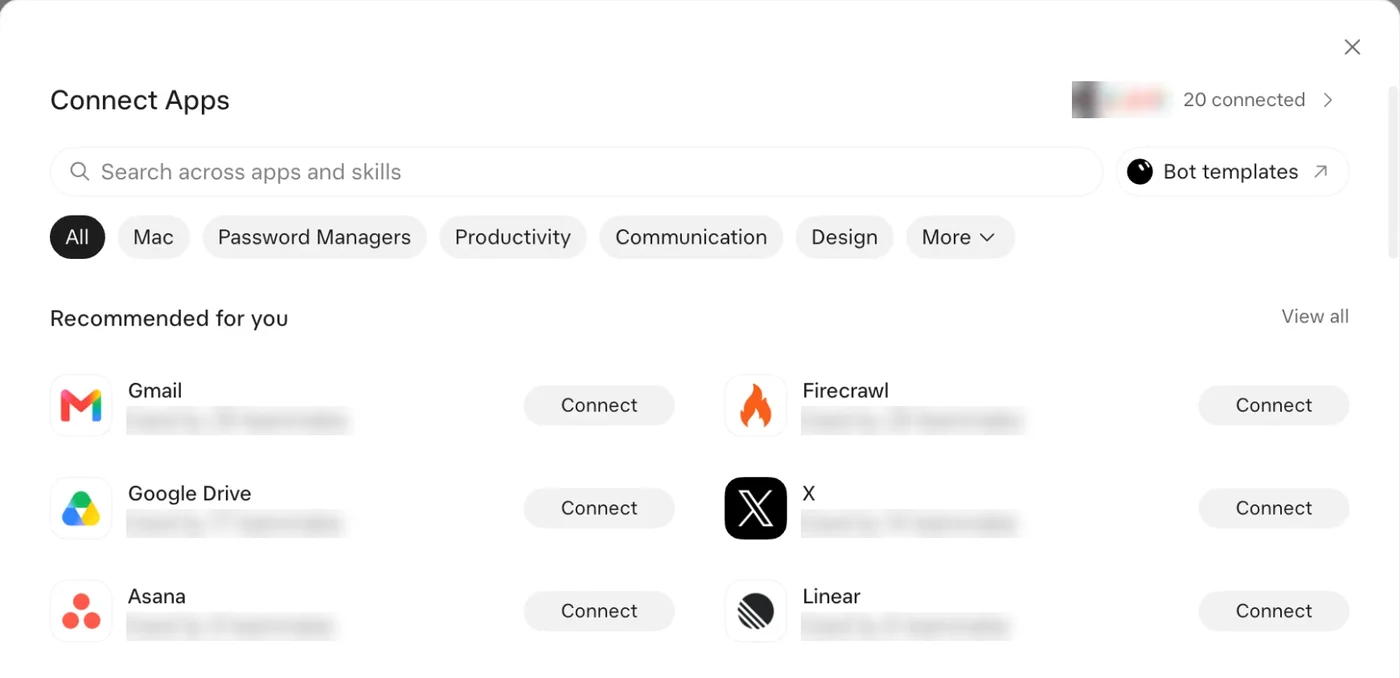
Connect your Firecrawl account
Grok Bot opens Firecrawl in your browser. Sign in, choose a team with Alexandria enabled, and select Authorize. The screen names Cursor, because the plugin is published on the Cursor Marketplace. No account yet? You can create one for free in the same flow.
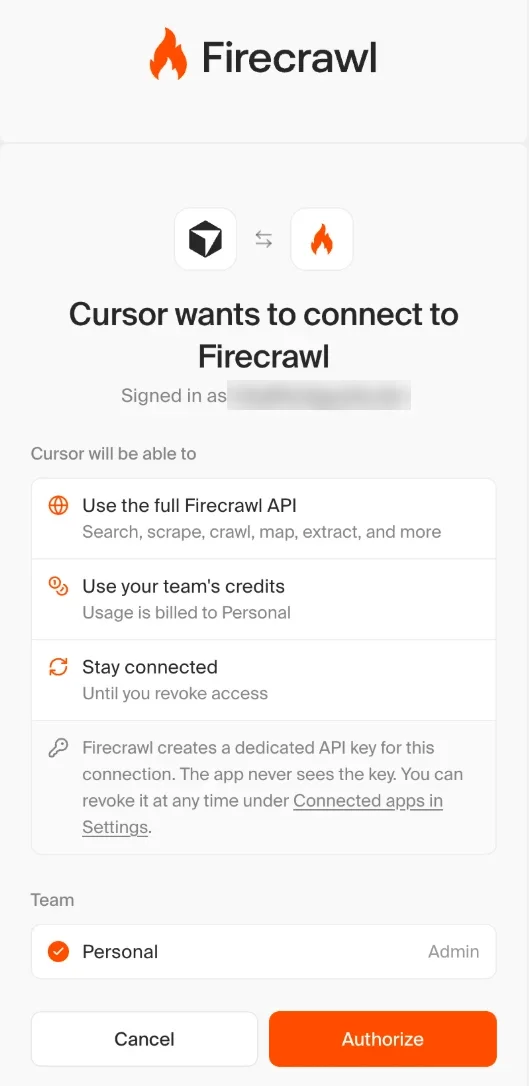
Ask your Bot for the data
In a chat, ask in plain language and mention Wowhead or Firecrawl Alexandria. To make sure the Bot uses Firecrawl, type @ and choose Firecrawl first. For example:
Use Firecrawl to show the 10 latest posts from Wowhead’s all-wow news feed, with publication times, headlines and article links.
What can Grok Bot do with Wowhead?
Wowhead (World of Warcraft and Blizzard games): news RSS feeds and paged news lists with articles and comments, the Blizzard Blue Tracker (forum posts and news), search suggestions and database tooltips, all from the site's anonymous JSON, XML and server-rendered data islands. Public guide discovery (class, build, leveling and every other category, on retail and each Classic branch) and full guide markup with the guide's page navigation and structured talent builds, paginated page comments, complete comment replies, Blue Tracker news detail, and the public Wowhead forums (board topic listings and topic posts).
Grok Bot can run any of Wowhead's 14 capabilities through Alexandria. Each call is billed in Firecrawl credits on your Firecrawl team.
- Blue tracker: Wowhead's Blue Tracker: the latest Blizzard employee posts on the US and EU World of Warcraft forums and Blizzard news articles, 50 per page, newest first, with topic ids, regions, forums, excerpts, authors and post counts. Continue with both next_page and next_offset; limited results resume on the same page until all entries are returned. Costs 5 Firecrawl credits per call.
- Blue tracker news: Read a Blizzard news article mirrored by Wowhead Blue Tracker. Accepts kind=news identifiers from blue_tracker. Returns full body HTML and original Blizzard source URL; source-relative posting text is preserved without inventing an absolute timestamp. Costs 5 Firecrawl credits per call.
- Blue tracker topic: The Blizzard posts of one forum topic mirrored by Wowhead's Blue Tracker: post ids, authors, titles, ISO 8601 timestamps and body HTML. Costs 5 Firecrawl credits per call.
- Comment replies: Retrieve the complete public reply array for a comment from comments_list, including replies omitted from the page preview. Supply the original page URL to preserve its game branch, and the returned comment id. Costs 5 Firecrawl credits per call.
- Comments list: Read public comments from a Wowhead guide, news article or database page. Offset pagination preserves all embedded comments, sorted by id. Retains data_tree because pages may include comments from other game versions. When replies_complete is false, call comment_replies with this URL and comment id. Null means the page does not declare a reply total. Does not assert coverage beyond the embedded public list. Costs 5 Firecrawl credits per call.
- Forum topic: One page of a public Wowhead forum topic (20 posts per page): subject, board, reply count, and each post's author, timestamp, markup body, edit record and moderator note, with direct post links and page continuation. Costs 5 Firecrawl credits per call.
- Forum topics: One page of a public Wowhead forum board (50 topics per page, stickies first on page 1): topic ids, subjects, authors, reply counts, creation and last-post timestamps with direct links, and the board's total topic and page counts. Costs 5 Firecrawl credits per call.
- Guide get: Read a public Wowhead guide (class, build, leveling or any other category) with its complete authored body markup, author, publication/update timestamps and game version. `pages` lists the guide's own navigation (the other pages of a multi-page class guide: talent builds, rotation, stats, gear, ...), and `builds` extracts every talent build the guide references with its Blizzard import string and talent calculator link. Legacy guide links (`/guides/{slug}`) are followed to the canonical guide. Use comments_list for discussion. Costs 5 Firecrawl credits per call.
- Guides search: Discover public WoW guides by branch, category, title query, class and specialization. Filters and offset pagination apply to the embedded guide index, sorted by id. Use branch forever for WoW Forever. Search is title substring matching, not full-text search. Costs 5 Firecrawl credits per call.
- News article: One Wowhead news article by id or URL: headline, ISO 8601 published/modified timestamps, author, section, keywords, description, header image, the article body in Wowhead markup and the inline reader comments. Costs 5 Firecrawl credits per call.
See all 14 capabilities and their inputs on the Wowhead API page.
What should I ask Grok Bot?
Name Wowhead or Firecrawl Alexandria in the prompt so Grok Bot reaches for it.
- Use Firecrawl to show the 10 latest posts from Wowhead’s all-wow news feed, with publication times, headlines and article links.
- Use Firecrawl to find up to five public Wowhead guides with leveling in the title and read the first guide’s authored body, author and update time.
- Use Firecrawl to show the 10 newest Blizzard employee entries in Wowhead’s Blue Tracker, with forum region, author, excerpt and source links.
- Use Firecrawl to search Wowhead suggestions for Thunderfury and read the tooltip for the first matching item.
Troubleshooting
Why doesn't my Bot use Wowhead?
Attach Firecrawl to the chat with @ before you ask, and name Wowhead or Firecrawl Alexandria in the prompt.
Add to Grok Bot doesn't open the app. What should I do?
Install the Grok Bot desktop app first, or open Connect apps in Grok Bot and search for Firecrawl.
Use Wowhead in other AI apps
The same Firecrawl account reaches Wowhead from other AI apps. Pick one for its setup steps:

Other data providers you can connect to Grok Bot
Frequently Asked Questions
What is Firecrawl?
Firecrawl is the web data API to search, scrape and interact with the web at scale. It turns websites into clean, LLM-ready data for AI agents and apps. The Firecrawl plugin brings those tools into Grok Bot, along with every data provider in Firecrawl Alexandria.
What is Firecrawl Alexandria?
Firecrawl Alexandria is Firecrawl's library of 550+ data providers for AI agents, Wowhead among them. Each provider returns structured data through documented capabilities. Grok Bot finds the capability that fits your question and calls it through the Firecrawl plugin, so you don't write any integration code. Alexandria needs a Firecrawl account signed in on a team with Alexandria enabled, or an API key from such a team; keyless connections don't include it.
Is there a Wowhead MCP server for Grok Bot?
Grok Bot reaches Wowhead through Firecrawl's hosted MCP server, which serves Wowhead and every other Alexandria provider as tools. Add the Firecrawl plugin once and you don't install or host a separate MCP server for Wowhead.
What does connecting Wowhead to Grok Bot unlock?
Grok Bot can run all 14 of Wowhead's capabilities, including Blue tracker, Blue tracker news and Blue tracker topic, from any chat, with structured results it can sort, compare and summarize. For example, ask: "Use Firecrawl to show the 10 latest posts from Wowhead’s all-wow news feed, with publication times, headlines and article links." In the same conversation, Grok Bot can combine Wowhead with Firecrawl's web search and scraping and the other providers in Firecrawl Alexandria.
Do I need my own Wowhead account or API key to use it in Grok Bot?
No. Grok Bot calls Wowhead through Firecrawl Alexandria and each call is billed in Firecrawl credits, so you don't need a separate Wowhead account or API key.
How much does it cost to use Wowhead in Grok Bot?
Each Wowhead call costs 5 Firecrawl credits. The capability list on this page shows each price and its unit. The credits come from the Firecrawl team you connect to Grok Bot, and finding the right capability is free.
Can Grok Bot use other providers besides Wowhead?
Yes. The same Firecrawl plugin reaches every provider in Firecrawl Alexandria, along with Firecrawl's web search and scraping, so you connect once.
Can I use Wowhead in other AI apps?
Yes. Connect Firecrawl to ChatGPT, Claude, Cursor, Muse signed in on a Firecrawl team with Alexandria enabled, or use the Firecrawl MCP server, CLI or API with an API key from that team, and the same Wowhead capabilities are available there. Keyless connections don't include Alexandria.