How to connect OpenRouter to Claude
Add the Firecrawl connector to Claude once and it can call the OpenRouter API and every other provider in Firecrawl Alexandria, with no OpenRouter integration code.
To connect OpenRouter to Claude, add the Firecrawl connector to Claude, sign in on a Firecrawl team with Alexandria enabled, and ask for OpenRouter data in plain language. The connection works in Claude on the web, Claude Desktop and Cowork, and you set it up once.
Claude uses OpenRouter as an MCP tool through Firecrawl's hosted MCP server, so you don't install or host a separate MCP server for OpenRouter.
Claude is Anthropic's AI assistant. Connectors give it tools from other services, and the Firecrawl connector adds web search, scraping and every data provider in Firecrawl Alexandria.
How do I connect OpenRouter to Claude?
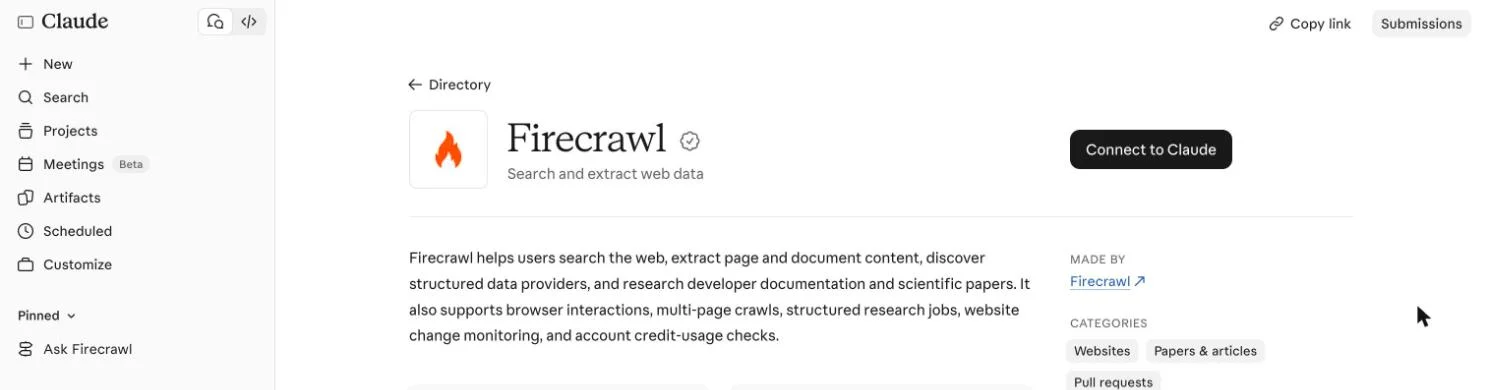
Add the Firecrawl connector
Open the Firecrawl connector in Claude's connector directory and select Connect to Claude. In Claude Desktop you can also go to Customize, then Connectors, and search for Firecrawl.
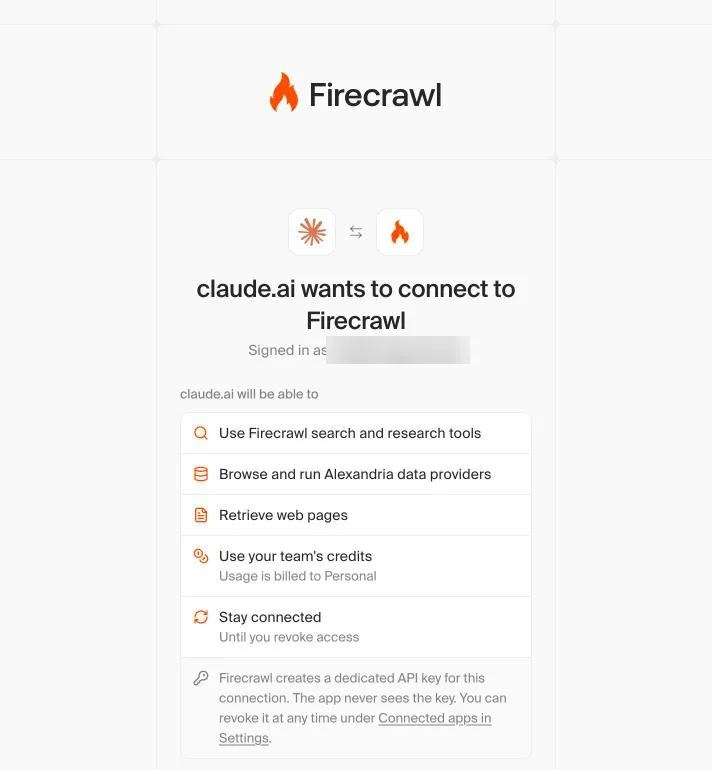
Connect your Firecrawl account
Claude opens Firecrawl in your browser. Sign in, choose a team with Alexandria enabled, and approve access. No account yet? You can create one for free in the same flow.
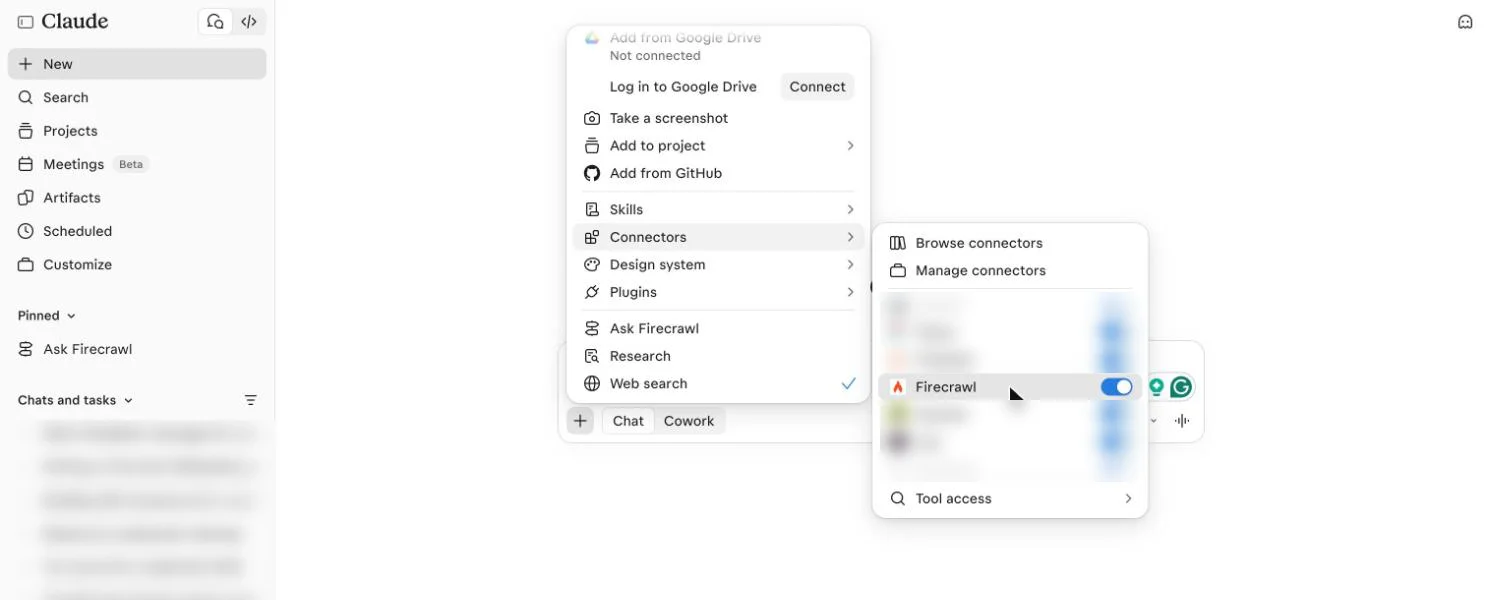
Turn on Firecrawl in a chat
In a new conversation, open the + menu, go to Connectors and switch on Firecrawl.
Ask Claude for the data
Ask in plain language and mention OpenRouter or Firecrawl Alexandria. Claude finds the OpenRouter capability that fits, checks its inputs and runs it. For example:
Use Firecrawl to find 10 OpenRouter text models supporting tools with at least a 128,000-token context, sorted by lowest price.
What can Claude do with OpenRouter?
OpenRouter model catalog and marketplace data: search models by modality, author, provider and price; per-model provider endpoints with pricing, limits, data policy and uptime; effective and listed price history; usage and availability stats; the provider directory; author lineups; and documentation pages such as the Decisions API reference and the Jev decision-model guide. Anonymous public endpoints only; no inference.
Claude can run any of OpenRouter's 8 capabilities through Alexandria. Each call is billed in Firecrawl credits on your Firecrawl team.
- Get docs page: One page of the OpenRouter documentation as Markdown (`GET /docs/{path}.md`, the docs site's machine-readable rendering), e.g. the Decisions API reference (`api/api-reference/alphadecisions/submit-a-decisions-request`, request/response schema and error codes) or the Jev guide (`guides/community/jev`, question types and confidence semantics). Returns title, summary and the full Markdown, truncated at `max_chars` when set. Unknown paths are `not_found`. Costs 5 Firecrawl credits per call.
- Get model: One model by slug: the public catalog record (`GET /api/v1/model/{author}/{slug}`: permaslug, modalities, context, list pricing, supported parameters, router alias target) plus every provider endpoint serving it (`GET /api/v1/models/{author}/{slug}/endpoints`: provider, pricing, context, max tokens, quantization, tool support, status and recent uptime/latency/throughput). Unknown slugs are `not_found`. Costs 5 Firecrawl credits per call.
- Get model endpoints: Full provider-endpoint records for one model variant from the model page's data API (`GET /api/frontend/v1/stats/endpoint`): endpoint UUID, provider identifiers and base URL, display pricing per million tokens, data policy (training, retention, publishing), rate limits (`limit_rpm`, `limit_rpd`), capability flags, deprecation date and the recent latency/throughput percentiles. Empty for an unknown permaslug or variant, reported as `not_found`. Costs 5 Firecrawl credits per call.
- Get model pricing: Current and historical pricing for one model variant: traffic-weighted effective input/output prices and per-provider summaries with token volume (`GET /api/frontend/v1/stats/effective-pricing`), the daily effective price series, and each provider endpoint's listed price change history for input, output, cache read/write and discount (`GET /api/frontend/v1/stats/listed-pricing`). Prices are USD per million tokens. A permaslug with no priced endpoint is `not_found`. Costs 5 Firecrawl credits per call.
- Get model stats: Recent usage and availability for one model variant: daily request counts, prompt/completion/reasoning/cached tokens, tool calls, media counts and spend (`GET /api/frontend/v1/stats/model-activity`), plus daily uptime per provider endpoint and for OpenRouter's routing overall (`GET /api/frontend/v1/stats/uptime-recent`). A permaslug with no activity and no uptime rows is `not_found`. Costs 5 Firecrawl credits per call.
- List author models: All models published under one author/organization slug with each model's primary endpoint (`GET /api/frontend/v1/author-models`): slug, permaslug, modalities, context, group, and the primary endpoint's provider, pricing, limits and data policy. Router aliases (`~author/name`) appear with a null endpoint. Unknown authors are `not_found`. Costs 5 Firecrawl credits per call.
- List providers: Directory of every inference provider OpenRouter routes to (`GET /api/frontend/v1/all-providers`): slug, name, API base URL, headquarters, data policy (training, prompt retention, publishing, terms and privacy URLs), status page, BYOK and capability flags. Optional `q` filters by slug or name client-side; the result is the full list otherwise. Costs 5 Firecrawl credits per call.
- Search models: Search and list the OpenRouter model catalog (documented public API `GET /api/v1/models`) by free text, output/input modality, author, hosting provider, use-case category, supported parameters, price, context and data region, sorted server-side; offset-paginated. Each model carries its slug, versioned permaslug, modalities, context length, list pricing and the top provider's limits. Note the API defaults to text-output models: pass `output_modalities` (e.g. `decisions`, `image`, `all`) to see others. Costs 5 Firecrawl credits per call.
What should I ask Claude?
Name OpenRouter or Firecrawl Alexandria in the prompt so Claude reaches for it. Each example opens in Claude with the prompt filled in.
- Use Firecrawl to find 10 OpenRouter text models supporting tools with at least a 128,000-token context, sorted by lowest price.
- Use Firecrawl to show the catalog record and provider endpoints for typesafe/jev-1.13, including modalities, pricing and recent uptime.
- Use Firecrawl to show the listed and effective price history for typesafe/jev-1.13, resolving its current versioned model identifier first.
- Use Firecrawl to read the OpenRouter Jev guide and summarize its question types and confidence semantics.
Troubleshooting
Why doesn't Claude use OpenRouter?
The connector has to be on in each conversation. Open the + menu, go to Connectors and check that Firecrawl is switched on, then ask again and name OpenRouter or Firecrawl Alexandria in the prompt.
Claude says it can't reach the Firecrawl server. What should I do?
Open Customize, then Connectors, disconnect Firecrawl and connect it again. On a Team or Enterprise plan, an owner has to allow the connector before members can add it.
Why does Claude say OpenRouter isn't available?
Alexandria needs a Firecrawl team with Alexandria enabled. Reconnect Firecrawl and pick that team on the consent screen.
Use OpenRouter in other AI apps
The same Firecrawl account reaches OpenRouter from other AI apps. Pick one for its setup steps:

Other data providers you can connect to Claude
Frequently Asked Questions
What is Firecrawl?
Firecrawl is the web data API to search, scrape and interact with the web at scale. It turns websites into clean, LLM-ready data for AI agents and apps. The Firecrawl connector brings those tools into Claude, along with every data provider in Firecrawl Alexandria.
What is Firecrawl Alexandria?
Firecrawl Alexandria is Firecrawl's library of 550+ data providers for AI agents, OpenRouter among them. Each provider returns structured data through documented capabilities. Claude finds the capability that fits your question and calls it through the Firecrawl connector, so you don't write any integration code. Alexandria needs a Firecrawl account signed in on a team with Alexandria enabled, or an API key from such a team; keyless connections don't include it.
Is there a OpenRouter MCP server for Claude?
Claude reaches OpenRouter through Firecrawl's hosted MCP server, which serves OpenRouter and every other Alexandria provider as tools. Add the Firecrawl connector once and you don't install or host a separate MCP server for OpenRouter.
What does connecting OpenRouter to Claude unlock?
Claude can run all 8 of OpenRouter's capabilities, including Get docs page, Get model and Get model endpoints, from any chat, with structured results it can sort, compare and summarize. For example, ask: "Use Firecrawl to find 10 OpenRouter text models supporting tools with at least a 128,000-token context, sorted by lowest price." In the same conversation, Claude can combine OpenRouter with Firecrawl's web search and scraping and the other providers in Firecrawl Alexandria.
Do I need my own OpenRouter account or API key to use it in Claude?
No. Claude calls OpenRouter through Firecrawl Alexandria and each call is billed in Firecrawl credits, so you don't need a separate OpenRouter account or API key.
How much does it cost to use OpenRouter in Claude?
Each OpenRouter call costs 5 Firecrawl credits. The capability list on this page shows each price and its unit. The credits come from the Firecrawl team you connect to Claude, and finding the right capability is free.
Can Claude use other providers besides OpenRouter?
Yes. The same Firecrawl connector reaches every provider in Firecrawl Alexandria, along with Firecrawl's web search and scraping, so you connect once.
Can I use OpenRouter in other AI apps?
Yes. Connect Firecrawl to ChatGPT, Cursor, Grok Bot, Muse signed in on a Firecrawl team with Alexandria enabled, or use the Firecrawl MCP server, CLI or API with an API key from that team, and the same OpenRouter capabilities are available there. Keyless connections don't include Alexandria.